Quick Summary
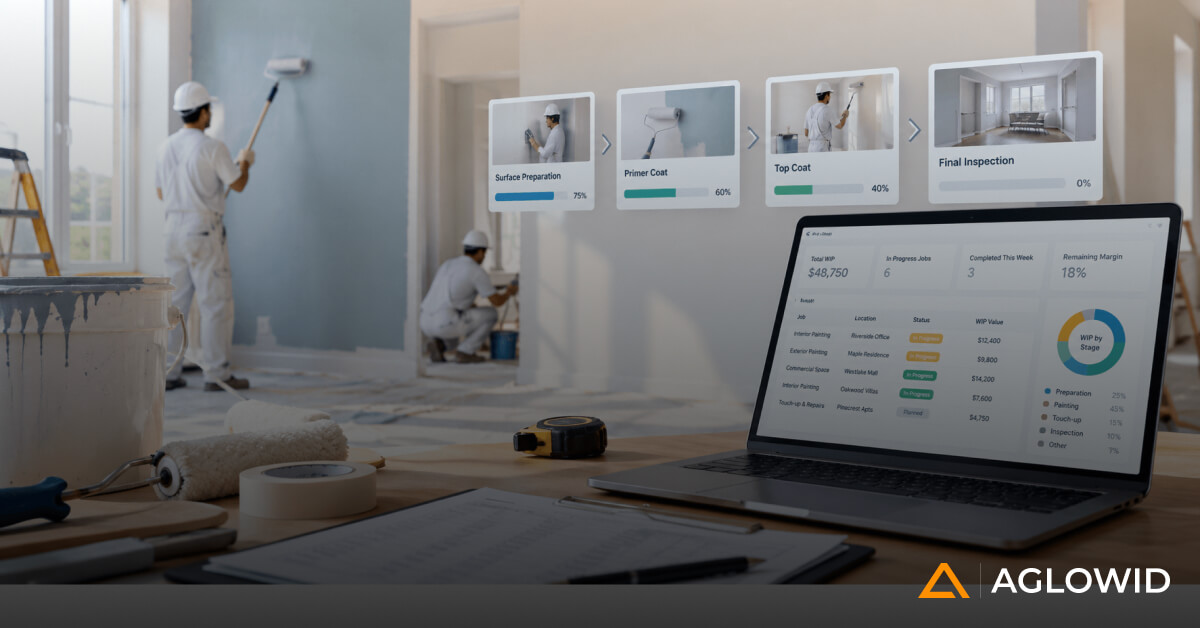
Painting and coating contractors rely on field information that changes daily but much of that information still travels via phone calls, spreadsheets and paper.” In this post, we’ll look at what mobile ERP for painting contractors really means, the unique features that matter for this trade, and how to determine if it’s a worthwhile investment for your firm. This blog covers everything from the day to day flow of work of a supervisor to the buyer questions to ask before you settle on a system.
Most painting and coating contractors already run some form of ERP or accounting system in the office. The problem is rarely the software itself. The problem is what happens between the moment a crew starts work on a jobsite and the moment that information actually reaches the office.
In a typical week, a project manager does not get timely updates from the field. Crew hours are submitted a day or two late, sometimes on paper, sometimes through a text message that gets forgotten. Material usage is tracked loosely, if at all, and often reconstructed from memory at the end of the week. Change orders sit in email threads or WhatsApp chats instead of becoming part of the official project record. Supervisors keep their own notes in notebooks or personal phones, separate from anything the office can see. Nobody compares actual production against the original estimate until the job is nearly finished, by which point it is too late to correct course. Billing teams wait on information that should have been available days earlier. And management, more often than not, learns about a problem only after it has already affected the schedule or the budget.
This is not a technology problem in the narrow sense. It is a connection problem. The field and the office are operating on two different sets of information, updated on two different timelines, and reconciled manually, if they are reconciled at all. Industry-wide, this disconnect is measurable. Research found that construction teams lose about 5.5 hours per person per week searching for project information that already exists somewhere, and that miscommunication alone accounts for 26 percent of all rework on U.S. construction jobsites.
A mobile ERP is meant to close that gap. Instead of adding another disconnected app to the mix, it extends the core ERP system into the field, so that crews, supervisors, project managers, estimators, and office staff are all working from the same project data, updated close to real time. That is the idea this article will build on, section by section.
What Is Mobile ERP for Painting Contractors?
It helps to be precise about what mobile ERP is not. It is not simply an ERP system that happens to have a mobile app attached to it. A lot of software marketed this way is really a field data collection tool with a thin connection back to the main system, or no real connection at all.
For a painting contractor, a proper mobile ERP connects field activity directly to the financial and operational core of the business. The relationship looks something like this:
Estimate leads to Project, Project assigns Crew, Crew generates Field Updates, Field Updates capture Labor and Material, Labor and Material roll into Progress, Progress surfaces Change Orders, Change Orders feed Billing, and all of it together produces Project Costing.
The important detail here is direction. Information should flow from the field back into the core system automatically, becoming part of project costing, billing, and reporting without someone re-entering it. If the mobile component only stores data for later manual transfer, it is just a mobile app with ERP branding, not a mobile ERP.
Why Mobile Operations Matter in Painting and Coating
Painting and coating work has a few characteristics that make mobile operations more than a convenience.
Multiple Crews and Locations
A mid-sized contractor may have several crews working across different commercial or industrial sites on the same day. Coordinating that from a single office location, using phone calls and spreadsheets, gets harder as the number of active jobs grows.
Field Conditions Change Quickly
Weather, surface conditions, access restrictions, material availability, actual production rates, and last-minute customer requests can all shift within a single day. Information that was accurate at 7 AM may not be accurate by noon.
Labor Is a Major Project Cost
For most painting contractors, labor is one of the largest line items on a job. Industry benchmarks put labor at 40 to 60 percent of total project cost for painting and drywall trades, well above many other construction trades. If those hours are not captured accurately and promptly, project profitability becomes something you estimate after the fact rather than something you actually measure. This is made harder by the fact that 45 percent of contractors still manually re-enter time data into payroll software, which adds delay and room for error right at the point where accuracy matters most.
Material Consumption Happens in the Field, Not the Office
Paint, coatings, primers, solvents, abrasives, masking materials, and other consumables get used on site. Unless that consumption is tied back to the correct project as it happens, material costs tend to get allocated loosely, or not at all.
Production Needs to Be Measured, Not Assumed
Square footage completed, linear footage completed, number of coats applied, surface preparation finished, hours worked, and areas remaining are the numbers that tell you whether a job is on track. Without a reliable way to capture them daily, “on track” becomes a guess.
Taken together, these factors mean that painting and coating work depends on accurate, current field information more than many other types of contracting work, simply because so much changes so quickly on a day-to-day basis.
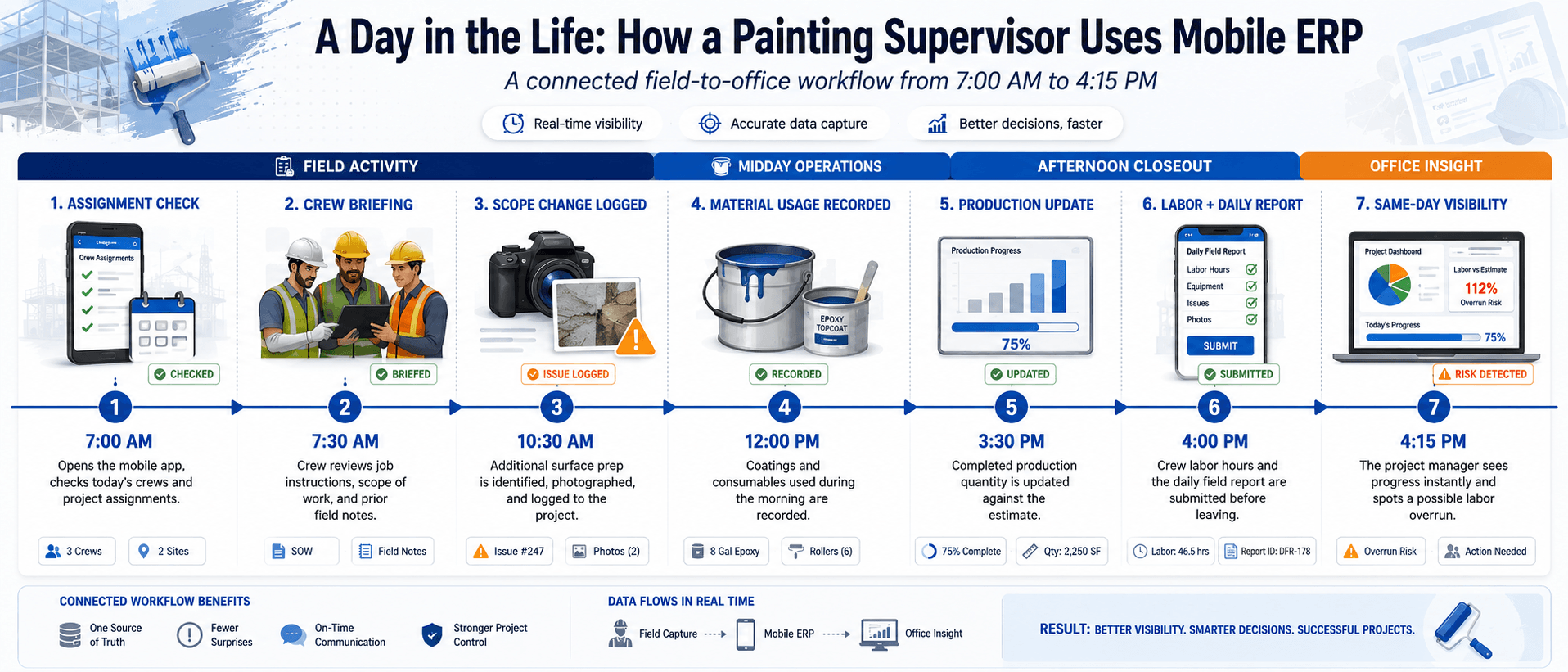
A Day in the Life: How a Painting Supervisor Uses Mobile ERP
Before going through the feature list, it helps to see how this actually plays out over the course of a single day.
7:00 AM. The supervisor opens the mobile app and checks the day’s crew assignments, confirming who is on site and which project they are assigned to.
7:30 AM. The crew arrives and reviews the job instructions, scope of work, and any notes left from the previous day’s field update, all on the same device.
10:30 AM. The crew discovers additional surface preparation is needed that was not part of the original scope. The supervisor photographs the area and logs it directly against the project.
12:00 PM. Material consumption for the morning is recorded, including how much coating and how many consumables were used.
3:30 PM. The supervisor updates the production quantity completed so far against the estimated total for the job.
4:00 PM. Labor hours for the crew and the daily field report are submitted before anyone leaves the site.
4:15 PM. The project manager, working from the office or another site entirely, sees the actual progress update and notices the crew is on pace to exceed the estimated labor hours for this phase of the job. Because the information arrived the same day, there is still time to adjust before the budget overrun becomes significant.
None of these steps are unusual on their own. What matters is that they all happened in one connected system on the same day, instead of being scattered across paper, text messages, and memory, and reconstructed by the office a week later.
See This Workflow Running on Your Own Projects
Walk through how field updates, labor, and materials connect to project costing in real time.
Book a Walkthrough →
Key Mobile ERP Features for Painting Contractors
This is the core of what to look for, and each feature below is tied specifically to painting and coating operations rather than treated as a generic ERP checklist item.
Mobile Job and Project Access
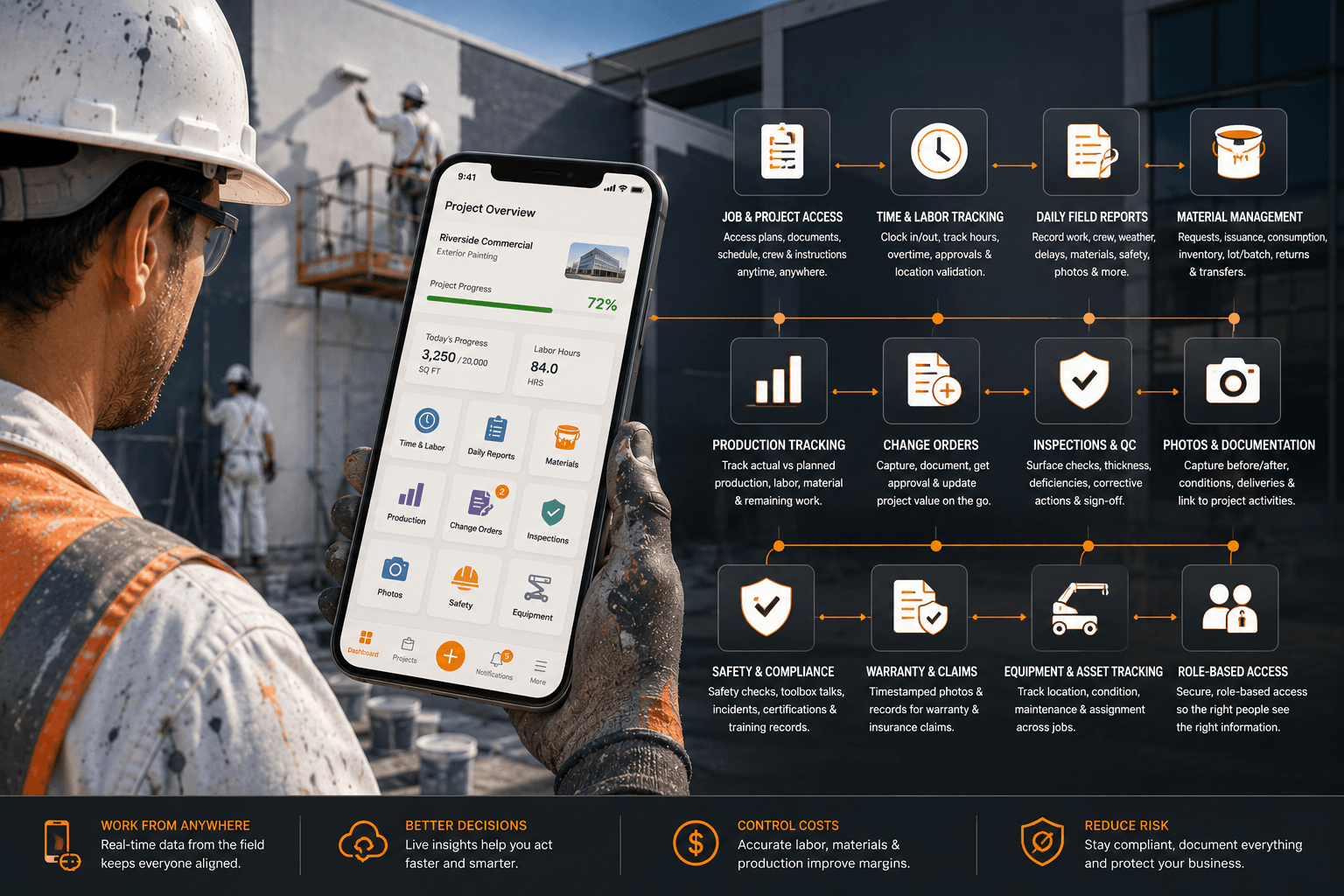
Field managers and supervisors need access to project information, scope of work, drawings and documents, customer information, the schedule, the assigned crew, job instructions, and any previous field updates, all from a mobile device before and during the work.
Mobile Time and Labor Tracking
This covers clock-in and clock-out, crew hours, allocation of hours to specific jobs or activities, overtime, labor recorded by activity type, approval workflows, and location validation where appropriate.
The financial reason this matters is straightforward. Labor data captured directly in the field can flow into project costing the same day, rather than being entered days later after the numbers have already lost some of their accuracy and their usefulness for making decisions.
Daily Field Reports
A mobile ERP should let supervisors record work completed, the crew assigned that day, hours worked, weather conditions, delays, site conditions, equipment used, materials consumed, safety observations, photos, and customer comments, all in one submission rather than scattered across separate tools.
Mobile Material Management
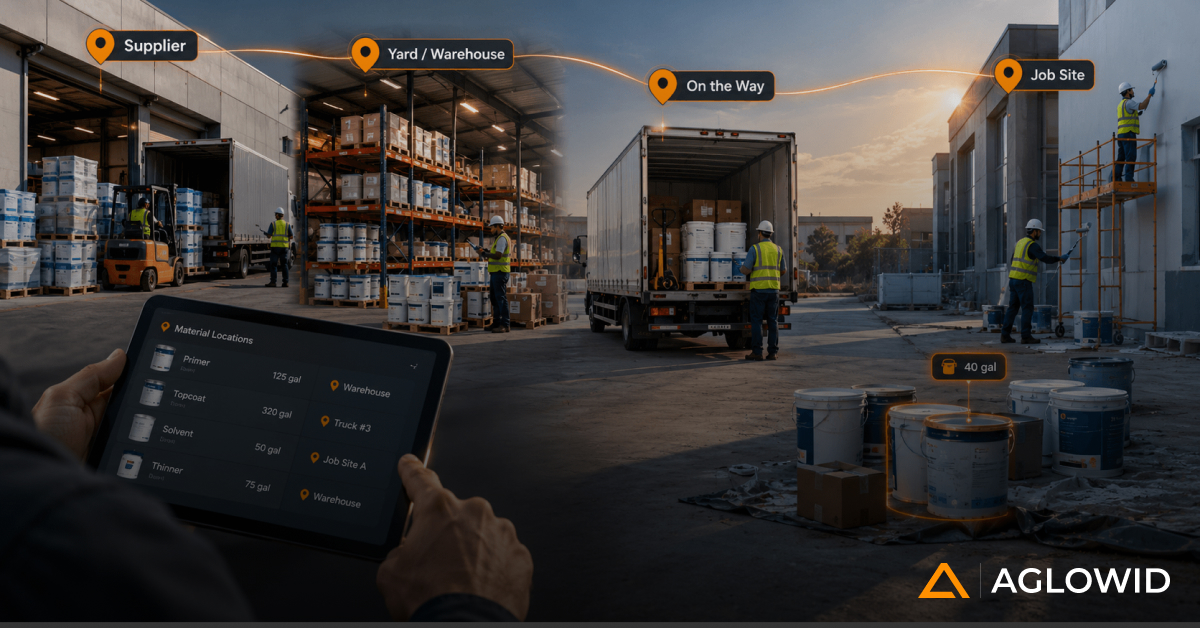
For painting and coating specifically, this includes material requests, material issuance, material consumption tied to a specific project, inventory availability, lot or batch information where required for coating specifications, material returns, and material transfers between jobs.
Production Tracking
This is one of the features that separates a genuine mobile ERP from a basic timesheet app. The system should allow field teams to record actual production against the planned or estimated production for the job.
For example, a project estimated at 20,000 square feet might show 3,500 square feet completed on a given day, against 84 labor hours used, a specific quantity of material consumed, and 16,500 square feet remaining. That is useful operational data that a project manager can act on immediately, rather than a raw timesheet that only becomes meaningful after someone manually cross-references it against the estimate.
Mobile Change Orders
Field teams often discover additional work before the office does. A mobile workflow can capture this as it happens: field discovery, followed by photos and documentation, a description of the additional work, quantities, customer approval, generation of the change order, and an updated project value, all initiated from the site rather than reconstructed later from memory.
Inspection and Quality Control
Depending on the type of contractor, this covers surface preparation checks, coating application checks, defined inspection points, thickness measurements, documented deficiencies, corrective actions, photos, and formal approval or sign-off. For industrial coating contractors in particular, this section carries real weight, since inspection records are often tied to contractual and warranty requirements.
Documentation for Warranty and Insurance Claims
Photo and inspection records are not only useful for internal quality control. For coating contractors in particular, this documentation often becomes necessary later, when a warranty claim is filed or an insurance dispute arises over the condition of a surface before and after work was performed.
Having timestamped photos, inspection records, and application details tied to a specific project inside the mobile ERP means that documentation exists and is retrievable months or years later, rather than depending on whether someone happened to save the right photos in the right place at the time. This is a relatively small addition to how a mobile ERP is used day to day, but it can matter considerably if a claim ever needs to be defended.
Safety and Compliance
This includes daily safety checks, toolbox talks, incident reporting, certifications, training records, site-specific requirements, and required documentation. This does not need to be the centerpiece of the article, but it should not be skipped either, since safety documentation is increasingly expected on commercial and industrial jobs.
Photos and Documentation
Mobile devices make it simple to capture before and after photos, surface conditions, completed areas, defects, damage, and material deliveries. The value here is not the photo itself but the fact that it is linked directly to a specific project and activity, rather than sitting in someone’s personal camera roll where it is effectively unusable for project records.
Mobile Approvals and Sign-offs
This covers approval of daily reports, timesheets, material requests, and change orders, as well as customer sign-off, all handled through the same mobile workflow rather than requiring a separate paper or email process.
Equipment and Asset Tracking
Painting and coating contractors also rely on sprayers, lifts, compressors, scaffolding, and other equipment that moves between jobs. A mobile ERP should be able to track the location of this equipment, its condition, its maintenance schedule, and which job it is currently assigned to. This matters most for contractors managing shared equipment across multiple active sites, where equipment sitting idle or misplaced has a direct cost.
Role-Based Access and Data Security
Since crews are often using personal devices as well as company-issued ones, access should be controlled by role. A crew member typically needs to see and submit information relevant to their own job, a supervisor needs broader visibility across their crew and site, and a project manager or office user needs visibility across multiple projects. Defining what each role can see and edit is a basic requirement, not an advanced one, and it is worth confirming during evaluation rather than assuming it is handled.
Check our Success Story
ERP Software for Painting & Coating Contractors
Centralizing Field, Finance, and Compliance with Odoo
Industry: Painting & Coating/Construction
Location: Canada
How Mobile ERP Connects Field and Office Operations
It is useful to compare the traditional workflow against a connected one directly.
In the traditional workflow, information moves from the field, through WhatsApp, Excel, or paper, to a supervisor, then to office admin staff, who eventually enter it into the ERP, which then reaches accounting. At each handoff, information can be delayed, duplicated, or simply lost.
In a mobile ERP workflow, information moves from the field directly into the mobile ERP, which feeds project management, which feeds costing, which feeds billing, which feeds management reporting, without the manual handoffs in between.
The real value here is not the mobile screen itself. Plenty of tools let a crew member enter data on a phone. The value is in what happens to that data after it is entered, and how quickly it becomes usable information for the people making decisions about the project.
Mobile ERP vs Separate Field Apps for Painting Contractors
It is worth being fair to the alternative here, since many contractors already use one or more specialized field apps and get real value from them.
| Separate Field Apps | Mobile ERP |
|---|---|
| Field data stored separately | Field data connected to the ERP |
| Manual data transfer between systems | Automatic flow into business processes |
| Separate user accounts per tool | Centralized system and single login |
| Limited connection to project costing | Field data feeds project costing directly |
| More integrations to build and maintain | Core processes already connected |
| Information often delayed | Near real-time visibility |
The point is not that separate field apps are always the wrong choice. Specialized apps can work well, particularly for a single function done very well. The real question to ask is whether the field application connects cleanly with estimating, project management, purchasing, inventory, and accounting, or whether it operates as an island that someone still has to manually reconcile with the rest of the business. That is a more useful evaluation question than simply asking whether a tool has a mobile app.
Integration with Your Existing Tech Stack
Most painting contractors already have some combination of accounting software, an estimating tool, and possibly a CRM in place before they start looking at mobile ERP. How well a mobile ERP integrates with what you already use is one of the more practical evaluation criteria, and one that is easy to overlook when a demo focuses mainly on the mobile app screens.
Accounting Software
This usually means a clean connection to tools like QuickBooks or Sage, so that labor and material costs captured in the field flow into your existing books without duplicate entry.
Estimating Tools
The original estimate a project was built on should be available as a reference point for the production tracking discussed earlier, rather than living in a completely separate file.
CRM and Customer Records
For contractors who manage a sales pipeline before a project is won, customer information and project history should carry over rather than requiring a second data entry step once a job is scheduled.
None of this needs to be complicated, but it is worth asking directly during evaluation rather than assuming it will work, since the gap between “supports integration” and “integrates cleanly with minimal setup” can be significant in practice.
Management Visibility and Project Profitability
Mobile ERP is not only a tool for field employees. Its value to management comes from the visibility it creates across active projects, and from what that visibility does for profitability.
What Management Should Be Able to See
At a minimum, management should be able to see active projects, crew allocation, labor utilization, planned hours against actual hours, production progress, material consumption, project costs, change orders, billing status, project profitability, and any delays or exceptions that need attention.
This is where the concept of an operations dashboard becomes useful. A simple example: a project shows as 62 percent complete, but has already consumed 71 percent of its estimated labor hours. That single comparison tells a manager more than either number would on its own, and it is exactly the kind of insight that a connected mobile ERP can surface automatically, rather than requiring someone to calculate it manually from separate reports.
How This Visibility Improves Profitability
It helps to connect each feature directly to a financial outcome, since that is ultimately what justifies the investment.
Faster field reporting leads to faster management response. Accurate labor capture leads to better project costing. Material tracking leads to lower unexplained consumption. Production tracking leads to early identification of productivity problems, while there is still time to address them. Change order capture leads to less unbilled work. Faster approvals lead to faster billing. Centralized project data leads to better profitability analysis across the whole business, not just individual jobs.
The scale of the underlying problem is well documented at the industry level. Non-optimal activities such as fixing mistakes, searching for project data, and managing conflict resolution account for an estimated 177.5 billion dollars in labor costs per year across the U.S. construction industry alone. Painting and coating contractors are not exempt from this pattern, and given how labor-intensive the trade is, the impact on margin can be proportionally larger.
This is the section that moves the conversation from software features to business value, and it is usually the part that matters most to an owner or a decision-maker evaluating whether the investment is worth making.
Understanding the Cost, Pricing Models, and ROI for Painting Contractors Mobile ERP
Common Pricing Structures
Pricing for mobile ERP systems generally falls into a few common structures. Some vendors charge per user per month, which scales with the size of your field and office team. Others charge by module, so you pay for time tracking, project costing, and inventory as separate add-ons rather than a single bundled price. Most systems also involve a setup or implementation cost, which can range from minimal for a simple configuration to substantial for a system that needs custom workflows built around your specific operations.
Estimating the Return
Rather than focusing on a specific price point, which varies significantly by vendor and by how much customization your business needs, it is more useful to think in terms of return. A supervisor who currently spends an hour a day compiling reports manually, across a crew of ten supervisors, represents meaningful time that a mobile system can recover. A reduction in unbilled change order work, even a modest one, often pays for the system on its own over the course of a year. Faster billing cycles, driven by field data reaching the office the same day instead of a week later, improve cash flow directly. These are the numbers worth estimating for your own operation before comparing vendor pricing, since they give you a realistic sense of what the system needs to deliver to be worth the investment.
Not Sure What This Would Look Like for Your Crew Size?
Get a straightforward estimate of the time and cost a connected system could realistically save your business.
Get a Custom Estimate →
Onboarding and Change Management for Field Crews
One of the more practical objections contractors raise is that field crews are not always comfortable with new technology, and a system that looks impressive in a sales demo can fail in practice if crews find it too complicated to use on a jobsite.
Start With Supervisor Buy-in
Getting supervisor buy-in first matters more than training the entire crew at once, since supervisors are the ones who will reinforce daily use once the system is live.
Keep the Field Interface Simple
A simple, uncluttered interface matters more in the field than it does in the office, since crews are using the app in work conditions, often with gloves on or in bright sunlight, not sitting at a desk.
Roll Out in Phases
A phased rollout, starting with one or two crews or a single feature like time tracking before expanding to the full feature set, tends to work better than switching everything over at once. None of this is complicated, but skipping it is one of the more common reasons an otherwise capable system sees poor adoption in the field.
What to Look for When Choosing a Mobile ERP for Painting Contractors
Instead of asking whether a system has a mobile app, a more useful set of questions looks like this.
Does it work offline, given that many job sites have unreliable connectivity. Can field data connect directly to project costing, which is the single most important question on this list. Can users capture photos and documents against specific jobs. Can it handle multiple crews and multiple projects at the same time. Can it track production, not just hours worked. Can it manage change orders starting from the field. Does it integrate cleanly with your accounting software, your estimating workflow, and your CRM if you use one. Can it handle painting and coating-specific workflows rather than generic construction workflows. Is the interface simple enough for field crews to use without extensive training. Can management configure workflows and approvals to match how your business actually operates. Does it scale as the company grows, both in terms of user count and complexity.
Common Mistake: Buying an App Instead of a Mobile ERP
There is one mistake worth calling out directly, since it is the most common gap between expectation and reality.
A mobile app can digitize a single field activity effectively. A mobile ERP needs to connect that activity to the rest of the business. A crew submitting 80 hours through a mobile app is useful on its own. But if those 80 hours do not automatically contribute to project cost, then to budget versus actual comparisons, then to project profitability, and then to billing, management is still left doing manual work to connect the dots. The app solved data entry. It did not solve the underlying disconnect between field and office that this article opened with.
When Should a Painting Contractor Invest in Mobile ERP?
A few signs tend to indicate that a company has outgrown spreadsheets and basic tools: multiple crews working simultaneously, projects spread across different locations, increasing project volume, significant field labor as a share of project cost, frequent change orders, daily reports that consistently arrive late, manual timesheet entry, difficulty tracking material consumption accurately, project managers spending more time chasing updates than managing the project itself, accounting waiting on field information before it can bill, and management lacking current data on project profitability.
You do not need to be a large contractor to benefit from mobile ERP. The real trigger is operational complexity, not company size. A smaller contractor running several crews across scattered sites can outgrow spreadsheets just as easily as a much larger one.
Frequently Asked Questions
Does mobile ERP work offline on job sites?
Good mobile ERP systems are built to work offline, storing data locally on the device and syncing once connectivity is available. This matters for painting contractors working in industrial sites, basements, or rural locations where signal is unreliable.
Is mobile ERP only useful for large painting companies?
No. The right trigger for adoption is operational complexity, such as running multiple crews or multiple active sites, rather than company size or revenue. Smaller contractors with several concurrent jobs often see the same benefits as larger ones.
How is mobile ERP different from a field service app?
A field service app typically digitizes one activity, such as time tracking or reporting, without connecting it to the rest of the business. A mobile ERP connects that same field activity directly to project costing, billing, and management reporting.
What does mobile ERP cost for a painting contractor?
Pricing usually follows a per-user subscription, a per-module structure, or a combination of both, along with a one-time implementation cost. The right way to evaluate cost is against the time and unbilled work it recovers, rather than comparing sticker prices alone.
How long does implementation typically take?
This depends heavily on how much of your existing workflow needs to be configured into the system. A straightforward setup can take a few weeks, while a system built around highly customized workflows can take longer.
Can mobile ERP integrate with QuickBooks or Sage?
Most established mobile ERP platforms offer integration with common accounting software. It is worth confirming during evaluation how clean that integration actually is, rather than assuming it is fully automatic.
Final Takeaway
Mobile ERP is not about putting your existing ERP on a phone screen. It is about connecting field work to project operations, to costs, to billing, and ultimately to the decisions management needs to make while there is still time to act on them.
For painting and coating contractors specifically, that connection makes field information useful much earlier in the life of a project, instead of arriving after the budget has already been affected. If your team is currently piecing together project status from texts, spreadsheets, and memory, that is usually the clearest sign it is time to look at what a properly connected mobile ERP could do for your operations.