
Quick Summary
Painting contractors juggle multiple crews, shifting site conditions, and thin margins that erode fast once costs go untracked. Painting contractor job costing software closes that gap by connecting estimates, field costs, change orders, and billing into one real time view of project profitability instead of a surprise at closeout. This article breaks down what the software should actually control, the features that matter most for SMB painting contractors, a worked example of catching an overrun mid project, and how to evaluate vendors without getting lost in a generic feature checklist.
Painting contractors rarely lose money because they cannot build an estimate. They lose it because the estimate, the field costs, the material use, the change orders, and the final invoice all live in different places and never talk to each other.
If you are running multiple crews across a mix of commercial and residential contracts, this probably sounds familiar. The admin load keeps growing, the tools keep multiplying, and by the time a project wraps, it is hard to say with confidence whether it actually hit its target margin or just felt busy.
The real value of job costing software is not that it records expenses. It is that it shows cost variance early enough for someone to actually act on it, while the project is still open, not after the final invoice has already gone out.
This guide walks through how job costing software protects gross margin, tightens estimating accuracy, controls labor and material overruns, captures change order revenue that would otherwise slip through, and cuts down the manual reconciliation that quietly eats a growing share of admin time as a painting business scales.
Why SMB Painting Contractors Lose Project Margin
The leak points are familiar to anyone who has run a crew for more than a season. Estimates get disconnected from what actually happens in the field. Labor overruns go unnoticed until the job is nearly done. Extra work gets performed on site and never makes it onto a formal change order. Material use drifts from what the estimate assumed, whether from an extra coat, a coverage miscalculation, or straight up wastage.
None of these are new problems. What separates a contractor who protects margin from one who does not is usually not better estimating. It is the difference between two ways of finding out a project is in trouble.
Post project reporting tells you “the project lost money,” after the invoice is sent and nothing can be done about it. Real time control tells you “the project is trending below target margin,” while there is still time to correct it.
That distinction is the core argument for job costing software, and everything below builds from it.
What Job Costing Software Should Actually Control
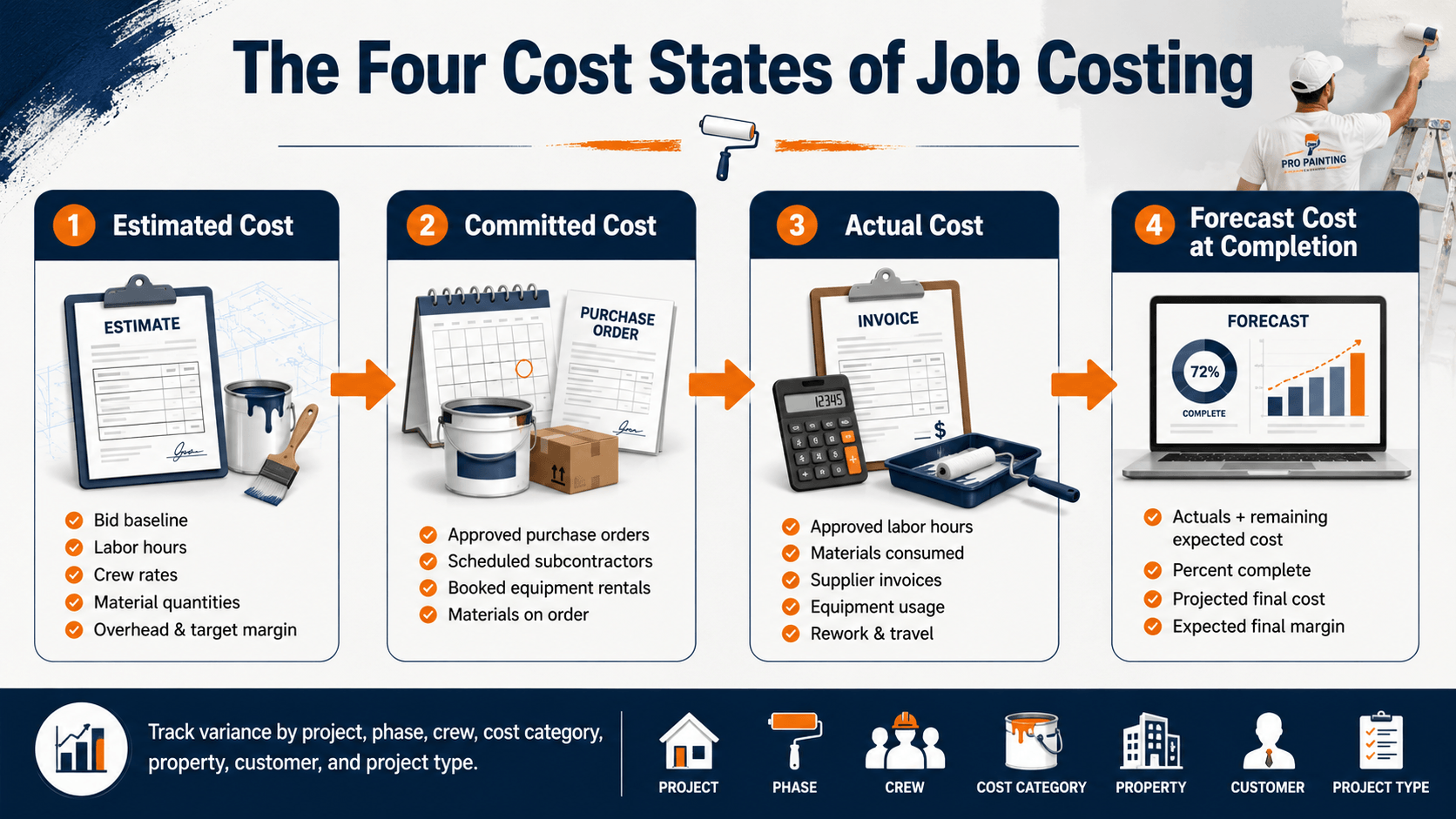
Think of job costing less as a record keeping tool and more as an operating control layer sitting on top of every active project. Most estimating tools are good at producing a number before the job starts. Fewer systems are good at keeping that number honest once the crew is actually on site, and that is really the whole job of a costing system. It should track four distinct cost states, and most of the value comes from how clearly a system separates them rather than blending them into one balance.
Estimated cost
The original assumptions the bid was built on: labor hours, crew rates, material quantities, equipment, subcontractors, prep work, overhead allocation, and target margin. This is the baseline everything else gets measured against, and it should stay locked once the contract is signed. If the estimate itself can be quietly edited later to make the numbers look better, the whole comparison loses its meaning. For a painting contractor, this baseline also needs to hold the coating system and prep assumptions specifically, not just a lump labor and material total, since those are usually where the actual job diverges from the bid.
Committed cost
Money that is spoken for but not yet spent. Approved purchase orders, scheduled subcontractor work, booked equipment rentals, materials already on order. This category matters because a project can look profitable if management only reviews posted costs and ignores what has already been committed but not yet invoiced. A lift rental booked for next week or a paint order sitting at the supplier both count against the budget the moment they are committed, not the moment the bill actually arrives. Skipping this step is one of the most common reasons a project looks fine right up until it suddenly does not.
Actual cost
What has really been spent. Approved labor hours, materials consumed, supplier invoices, equipment usage, subcontractor bills, travel, and rework. This is the category most systems already handle reasonably well, since it is simply a record of transactions that have already happened. The gap usually shows up in timing rather than accuracy: if actual costs post to the job a week or two after the work happened, the number is technically correct but too stale to act on while the crew is still on site.
Forecast cost at completion
The most useful of the four for a decision maker, and the one most systems get wrong. It combines current actual cost with remaining expected cost, based on percent complete and the work still ahead, to project where the job will land at final invoice. A project can look under budget today and still be headed for a loss by the time it closes, which is exactly what happens later in this article’s worked example. A good forecast should update automatically as new actuals and commitments come in, rather than waiting for someone to rebuild it manually in a spreadsheet once a month.
Variance across all four of these should be viewable by project, phase, crew, cost category, property, customer, and project type. A single blended number across the whole business hides exactly where the actual problem is, and a manager who can only see the total rarely has enough information to fix anything before the job closes.
Why Painting Contractor Job Costs Are More Complex Than Other Trades
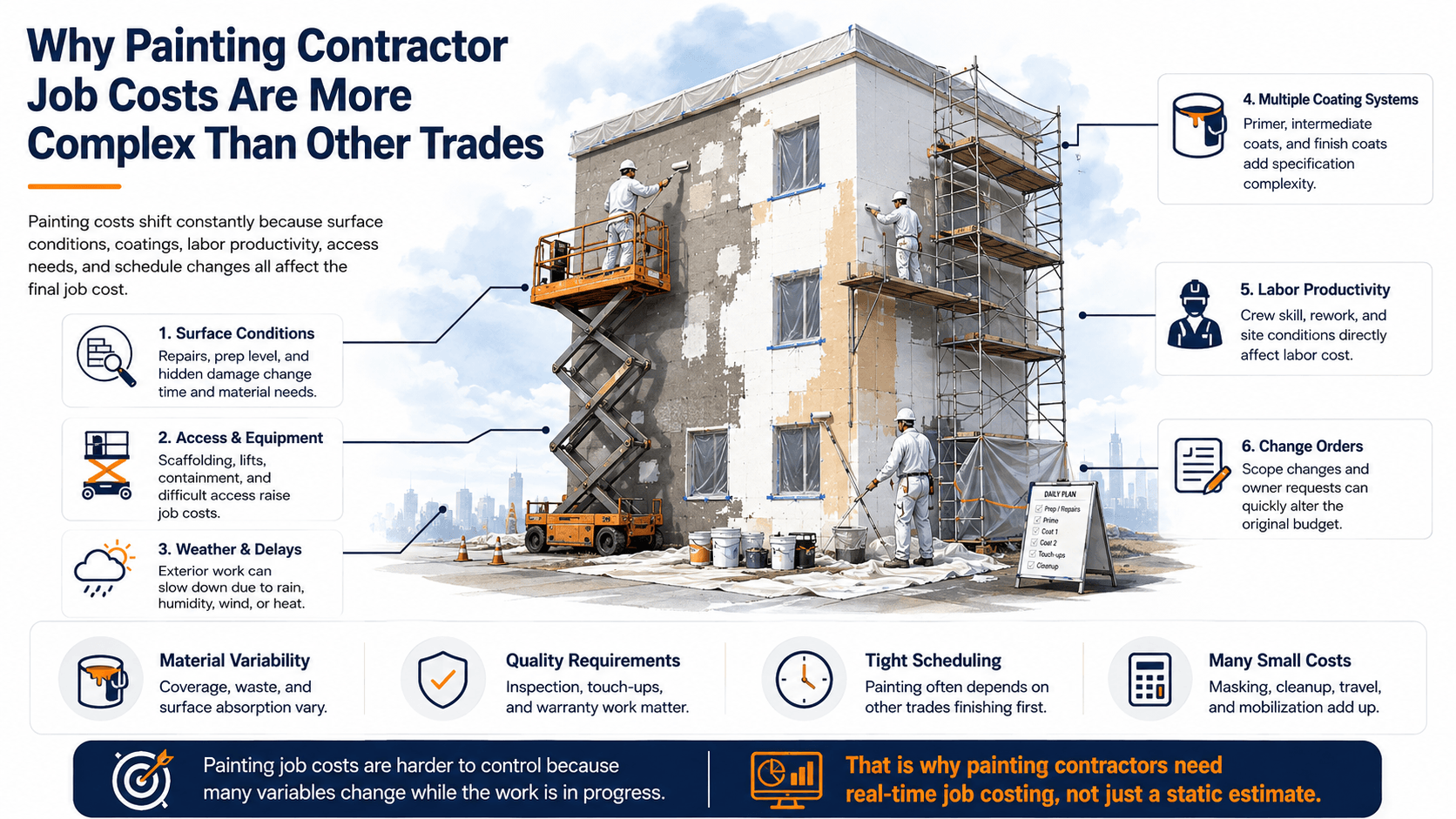
Generic construction cost tracking misses a lot of what actually drives painting job profitability. This is where the industry’s own quirks matter.
Surface conditions and prep
Two jobs with identical square footage can cost very differently depending on peeling paint, cracks, moisture damage, uneven surfaces, wallpaper removal, rust treatment, caulking, and pressure washing needs. Prep is often the single biggest source of estimate drift, and it is the hardest to spot from a proposal alone.
Coating systems and coverage
Cost varies with primer requirements, number of coats, product type, finish, surface porosity, interior versus exterior application, and spray versus brush and roll. Manufacturer coverage assumptions on the product data sheet do not always hold up once a crew is actually on site.
Crew productivity
Tracking productivity by crew, surface type, application method, and prep intensity produces far better future estimates than relying on one generic production rate for every bid, regardless of who is doing the work or what they are painting.
Commercial project complexity
Multiple floors or buildings, phased handover, restricted work hours, occupied premises, access and safety requirements, lift and scaffold scheduling, general contractor coordination, retainage, and formal change order approvals all add layers of cost tracking that a simple residential job never needs.
Multi location costing
For contractors serving apartment communities, retail chains, hotels, schools, or industrial sites, profitability needs to be visible at the property, building, unit, or work order level, not just at the overall contract level. A property manager asking which building came in over budget deserves a real answer, not a shrug.
The U.S. market this complexity plays out in is not small. The painting and wall covering contracting industry generates close to $49 billion in annual revenue nationally, and has grown at roughly a 2.2 percent yearly rate over the past five years, according to IBISWorld’s industry research. That kind of scale means the contractors who can price and track jobs more precisely have real room to take share from those still running everything off spreadsheets.
Painting Job Costing Workflow: From Estimate to Final Margin
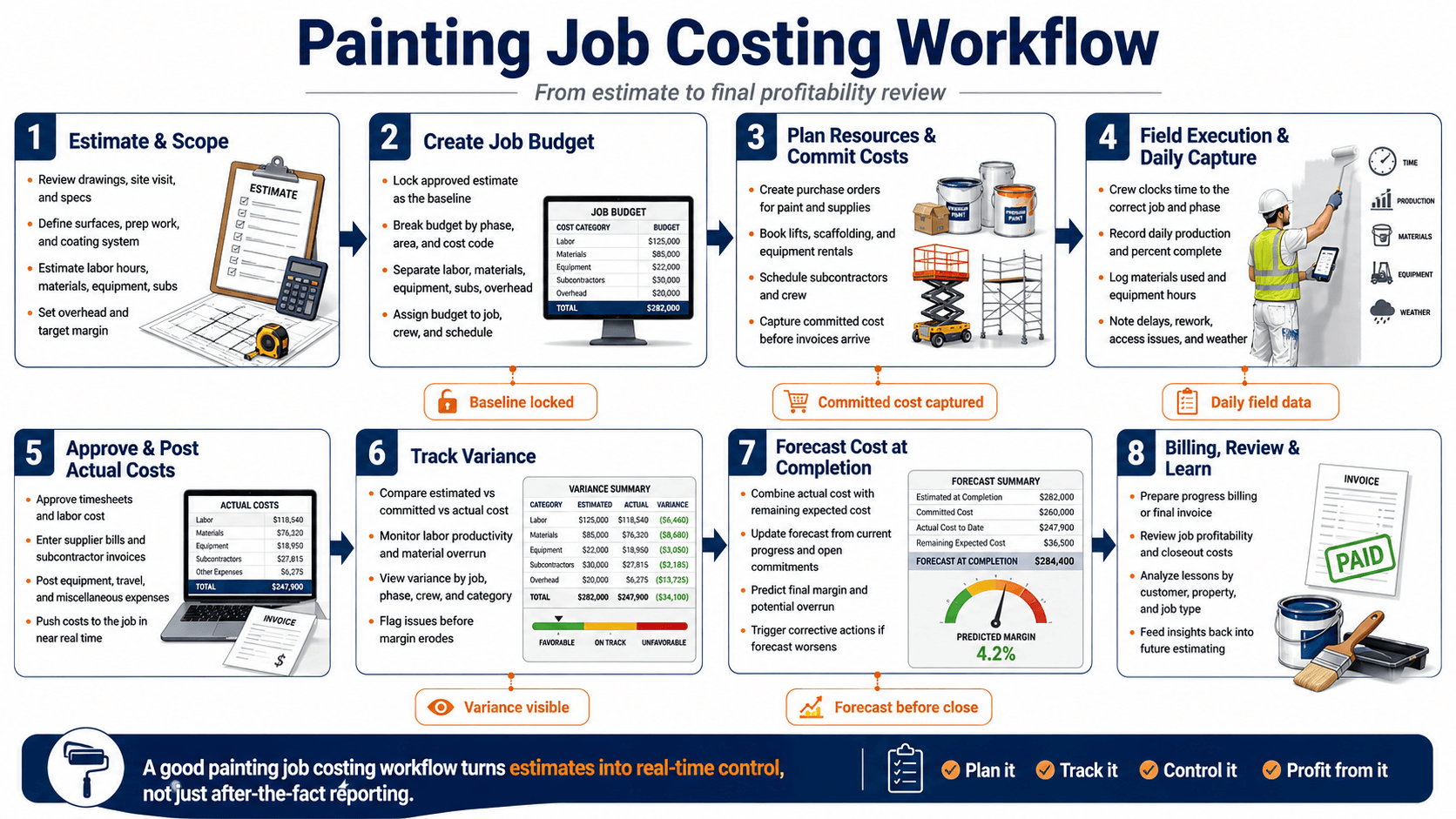
Each stage in a painting job costing workflow feeds the next. If the estimate never becomes a budget, if committed costs are not captured before invoices arrive, if field activity is not posted quickly, or if billing and closeout happen without a final profitability review, margin starts leaking long before anyone sees it in the books. Most painting contractors already perform some version of these steps. The difference is whether they happen inside one connected workflow or across disconnected tools such as estimating software, spreadsheets, texts, paper notes, and month-end accounting reports.
1. Estimate the job and define the scope
Covers: drawings, site visit findings, specifications, surfaces, prep requirements, coating system, labor hours, materials, equipment, subcontractors, overhead, and target margin.
Why it matters: this is the baseline the entire job will be measured against. If the estimate is too broad or incomplete, there is nothing reliable to compare actual performance against later.
2. Turn the estimate into a job budget
Covers: locking the approved estimate as the baseline, breaking the job into phases, areas, and cost codes, and assigning budget amounts for labor, materials, equipment, subcontractors, and overhead.
Why it matters: this is where the estimate becomes an operating budget instead of just a sales number. The budget needs to be structured in a way that can be tracked during execution, not just reviewed after the project is over.
3. Plan resources and capture committed costs
Covers: purchase orders for paint and supplies, booked equipment rentals, scheduled subcontractors, assigned crews, and any money already committed before supplier bills or subcontractor invoices arrive.
Why it matters: a project can look healthy if management only sees posted expenses and ignores what is already spoken for. Capturing committed costs early gives a more realistic view of the job before overruns become visible in accounting.
4. Capture field activity daily
Covers: crew time by job and phase, production progress, materials used, equipment hours, weather impacts, delays, access issues, rework, and field notes from the active site.
Why it matters: this is where job costing becomes useful in real time. If field data is late, incomplete, or disconnected from the job budget, management loses the chance to act while the work is still in progress.
5. Approve and post actual costs
Covers: approved timesheets, supplier bills, subcontractor invoices, equipment charges, travel, and miscellaneous project expenses, all posted back to the correct job as quickly as possible.
Why it matters: actual cost is the financial truth of the project. If costs arrive late or are posted to the wrong phase or category, the job report may be technically complete later, but it will not be useful when decisions still need to be made.
6. Track variance as the job progresses
Covers: estimated versus committed versus actual cost, labor productivity, material overuse, cost-code level performance, and variance by job, phase, crew, or category.
Why it matters: this is the control point. Variance reporting shows where the job is drifting away from plan so the team can correct it before margin erodes further.
7. Forecast cost at completion
Covers: actual cost to date, remaining expected cost, open commitments, percent complete, projected final cost, and expected final margin.
Why it matters: the most important question is not just what the job has cost so far, but where it is likely to finish. A job can still look acceptable on current actuals while already heading toward a margin problem at completion.
8. Bill, review, and feed lessons back into future work
Covers: progress billing or final invoice, closeout review, profitability analysis, lessons learned by customer or property type, and updates to future estimating assumptions.
Why it matters: this closes the loop. Comparing what was estimated, committed, spent, and finally billed is what improves future pricing, production assumptions, and margin discipline. Without this step, the same estimating and execution mistakes keep repeating from one job to the next.
A strong painting job costing workflow does more than record history. It connects estimating, budgeting, committed cost tracking, field execution, actual cost posting, forecasting, and billing into one chain so contractors can protect margin while the job is still live, not after the money is already gone.
Change order discipline in particular is worth taking seriously, since it is step five above and one of the easier steps to skip when a crew is already busy. Industry research on construction change management has found that the average project sees roughly a 10 percent shift in contract value from changes, and that a large share of contractors, around 43 percent in one industry survey, do not have a consistent process for managing them, according to D. Brown Management’s review of change order data. For a painting contractor, that is the gap between change orders becoming a healthy revenue stream and becoming unbilled work nobody remembers to invoice.
Seeing the workflow applied: catching an overrun before completion
The eight steps above stop being theoretical once they are applied to a real job. Here is what that looks like in practice.
A 120 unit apartment community exterior and common area repaint, contracted over an 8 week window with two crews rotating between buildings. The contract was priced at $85,000. Labor was estimated at $29,750, about 35 percent of the contract. Materials were budgeted at $19,550, around 23 percent. Equipment and subcontractors, including a lift rental and a pressure washing sub, were allocated $8,500, roughly 10 percent. Overhead was allocated at $10,200, about 12 percent, leaving a target gross profit of $17,000, a 20 percent margin.
In between the project end of week 4, labor is 55 percent consumed while the project is only 40 percent physically complete. Material consumption is running 12 percent above plan, driven by two coats being needed on units with heavier oxidation than the original site walk accounted for. Prep work has already exceeded its original allowance. One change order for additional stucco repair is still sitting unapproved. Forecast gross margin has slipped from the 20 percent target to closer to 11 percent.
Management review labor productivity on the crew running behind, check for material wastage on site, pause any unapproved extra work until it is properly documented, submit the stucco change order formally, update the forecast, and get ahead of the conversation with the property manager rather than surprising them at final invoice.
The lesson here is not subtle. The software does not create profit. It gives management the timely, reliable information needed to protect the profit that was already built into the original contract, before it quietly erodes to nothing.
Check our Success Story
ERP Software for Painting & Coating Contractors
Centralizing Field, Finance, and Compliance with Odoo
Industry: Painting & Coating/Construction
Location: Canada
Essential Job Costing Features for SMB Painting Contractors
These are the features that actually move the needle on margin protection, organized by the outcome each one protects rather than by how they get demoed on a sales call.
Job and phase level costing
Cost needs to allocate down to customer, property, unit, work order, phase, and cost code, not just sit against the contract as one lump total. A single contract number can look perfectly healthy while hiding a specific building or phase that is quietly dragging the whole job under target margin. For a contractor managing a multi building apartment complex or a retail chain with several locations on one master agreement, this is often the difference between knowing something is wrong and knowing exactly where to look.
Labor and crew tracking
This means mobile time entry, crew based entries, overtime and travel time, labor burden, an approval workflow, and estimated versus actual hours all visible in the same place. Labor is usually the single largest cost category on a painting job, and it is also the one most likely to drift without anyone noticing, since a crew running an hour or two long each day rarely triggers an alarm on its own. It is the accumulation across a multi week job that quietly changes the outcome, and that only shows up if hours are captured the same day they happen rather than reconstructed from memory at the end of the week.
Material and equipment cost control
This covers paint product and color tracking, material issue to a specific job, purchase orders and supplier pricing, wastage tracking, and equipment or rental cost allocation for sprayers, lifts, scaffolding, and vehicles. A product substitution because the original color was backordered, a coverage estimate that did not account for a more porous surface, or an extra day on a lift rental can each chip away at margin on their own, and stacked together they add up fast. None of that shows up until material and equipment cost is tracked against the specific job it was used on, rather than just logged as a general purchase.
Change order management
The core of this feature is digital approvals, scope documentation, cost of the added work, a revised budget, and an automatic sync into the invoice once work is approved. Approved extra work that never makes it onto the final invoice is one of the most common ways painting contractors leave money on the table, not because the work was not done, but because nobody carried it from the field notebook through to billing. A system that closes that loop automatically turns change orders from a source of quiet loss into one of the more reliably profitable parts of a project.
Budget versus actual reporting
Variance by labor, material, equipment, subcontractor, and overhead should roll up into one forecast variance and margin erosion view a manager can check without pulling three separate reports and reconciling them by hand. The whole point of this feature is speed of insight. If checking project health takes twenty minutes of cross referencing spreadsheets, it will not happen often enough to catch a problem while the job is still open.
Mobile field adoption
A simple interface, fast time entry, offline capability, photo attachments, and digital customer approvals matter more than almost any other feature on this list, because a system crews will not actually use in the field produces incomplete data no matter how good the reporting looks back at the office. Adoption is a bigger industry wide problem than most software buyers expect. Broad surveys of construction professionals have found that around 92 percent already use a smartphone daily at work, yet roughly 27 percent report that none of their work apps actually share data with each other, according to reporting on JBKnowledge’s Construction Technology Report published by Construction Dive. In other words, the phone is already in the crew’s pocket. The gap is integration, not willingness to use a device, which puts the burden on the software to be genuinely fast to use, not on the crew to change habits.
One more point worth stating plainly: accounting, payroll, CRM, and estimating tools should connect to whatever job costing system is chosen, rather than requiring duplicate data entry. Duplicate entry is where adoption breaks down fastest, and it is usually the first thing that gets skipped once a crew is busy.
The Metrics That Round Out the Picture
A job can hit its target margin on paper and still leave a business exposed if nobody is watching cash flow, the profitability of change order work specifically, or how one job’s performance compares to the next. These three are easy to overlook because none of them show up in a simple estimated versus actual comparison, but they tend to be what separates a contractor who is merely profitable from one who is actually growing with confidence.
WIP and cash flow visibility
Work completed but unbilled, cost incurred but not yet invoiced, unpaid invoices, retainage, and projected cash needs. A contractor can be technically profitable on paper and still be short on cash simply because billing has not caught up with the work already performed.
Change order profitability, specifically
Count and approved value are not enough on their own. The dashboard should show the margin on change order work separately from the base contract, since approved extras are sometimes priced thinner than the original bid and quietly drag the blended margin down without anyone noticing.
Business level rollups
Gross margin by customer and by service type, revenue per crew, crew utilization, bid to win ratio, rework cost, and overhead percentage, so management can see patterns across the whole business instead of reviewing one job at a time.
See Your Real Margin Before the Job Closes
Most painting contractors do not find out a project underperformed until the final invoice is already out the door. A connected job costing system flags the gap while there is still time to act on it.
Job Costing Software Versus ERP for Painting Contractors
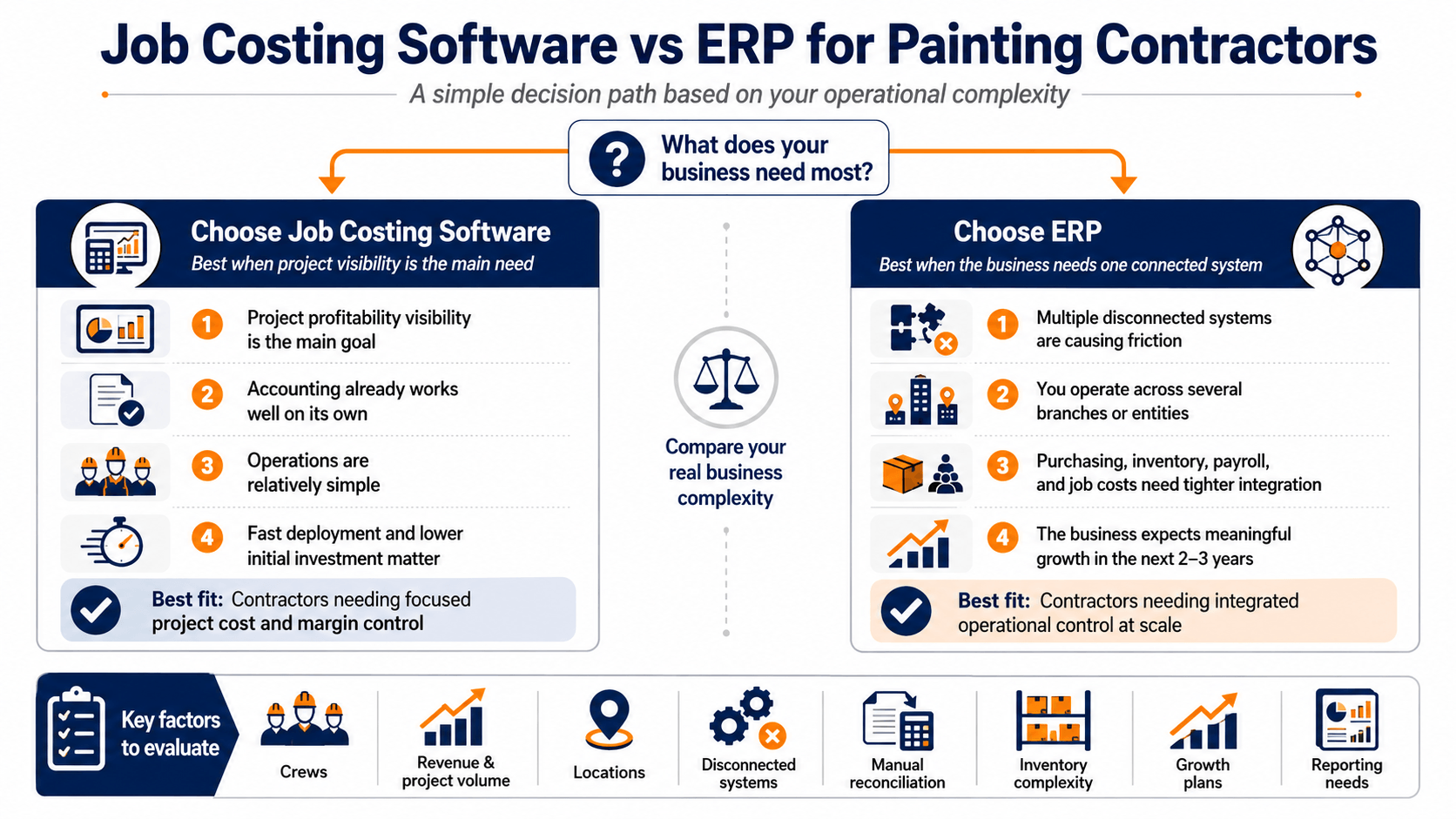
This is a genuine decision point, not a foregone conclusion, and the right answer depends heavily on how complex the business already is.
Job costing software alone is usually the right fit when: the core need is project profitability visibility, accounting already works fine on its own, the company operates from a limited number of locations, operations are relatively simple, and fast deployment matters more than one fully unified system.
Painting Contractors ERP is worth evaluating instead when: several disconnected systems are already in use and causing friction, the company operates across multiple branches or entities, purchasing and inventory need tighter control, payroll needs to sit inside the same system as job costs, and the business expects meaningful growth over the next two to three years.
| Evaluation area | Job costing software | ERP platform |
|---|---|---|
| Primary purpose | Project cost and margin control | Integrated business management |
| Implementation | Usually faster | More extensive |
| Accounting | Often integrates with existing tools | Usually built into the platform |
| Inventory | Basic to advanced, depending on product | Typically integrated across purchasing and finance |
| Scalability | Suitable for focused operational needs | Better for growing complexity |
| Cost | Generally lower initial investment | Higher investment, broader coverage |
| Best fit | Contractors needing project visibility | Contractors needing one operational system |
Before choosing either category, weigh the specific factors that actually apply to your business: number of crews, revenue and project volume, number of locations, how many disconnected systems are already in use, time currently spent on manual reconciliation, inventory complexity, growth plans, and reporting needs. None of these have a universally right answer, which is exactly why this deserves its own evaluation rather than defaulting to whatever a vendor happens to sell.
How to Evaluate Painting Contractor Job Costing Software Vendors
Treat this as the list of questions worth asking on a first vendor call, not a full procurement audit.
Functional fit
Does it handle painting specific estimating, prep and coating phases, labor burden, equipment costs, change orders, and progress billing, or is it a generic construction tool with painting features bolted on as an afterthought.
Usability
How fast is field time entry in practice, how simple is the approval workflow, and how much training does a new crew member actually need before they are using it correctly.
Integration
Does it connect cleanly with the accounting, payroll, and CRM tools already in place, or will data need to be entered twice.
Reporting quality
Ask for a live demo of the estimated versus actual report, the margin dashboard, and the WIP report specifically. These are the three reports that get opened weekly, if the software is doing its job.
Total cost of ownership
The cheapest license is rarely the cheapest total cost. Ask directly what implementation, data migration, training, and support cost beyond the subscription fee, and what it costs to add users or branches later. This is usually the real budget conversation happening internally, even when the sales call only ever discusses the license price.
Here is a detailed checklist that helps to evaluate your Painting Contractors software vendor. Choose wisely.
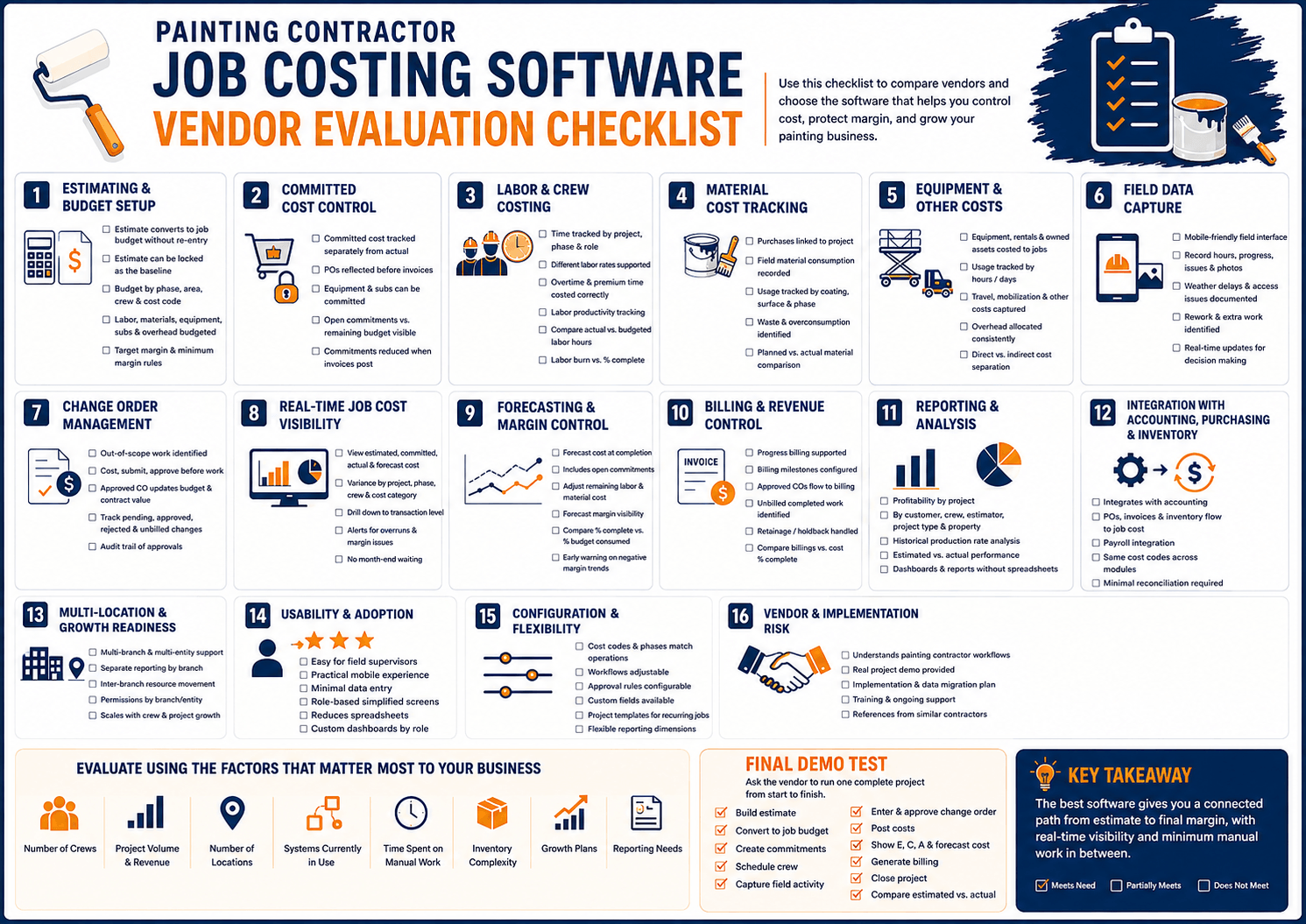
Common Implementation Mistakes
Worth reading closely if a rollout has ever gone sideways before, since most of these mistakes are avoidable and none of them are about the software itself.
- Buying software before the process is defined. Technology cannot fix unclear ownership or inconsistent approvals on its own.
- Tracking only labor and materials while ignoring equipment, subs, travel, overhead, and rework, all of which can materially change the real margin on a job.
- Ignoring field adoption. If crews cannot record time and materials quickly, the reports back at the office will simply be incomplete.
- Building overly complex cost codes that look thorough on paper but that employees stop using consistently within a few weeks.
- Treating change orders as paperwork instead of updating both the budget and the invoice at the same time.
- Watching revenue instead of margin, since a high revenue project can still be a poor decision if the underlying costs are not controlled.
- Failing to review the data on a regular cadence. Job costing only creates value when someone actually looks at the variance and acts on it, not when reports simply pile up unread.
Turn Cost Data Into Decisions
Painting contractors do not need more disconnected data. They need timely visibility into cost variance and margin while a project is still open, not a summary after it closes. The right software connects estimating, execution, purchasing, field operations, change orders, and billing into one place, so nothing gets lost in the handoff between the office and the field.
Still Running Project Profitability Off Spreadsheets?
If your team relies on disconnected tools to piece together project profitability, it may be worth reviewing your operating model. An integrated job costing or ERP approach can help protect margin and give your business room to grow with more confidence in the numbers behind every bid.
Painting Contractor Job Costing Software: Frequently Asked Questions
What is the difference between estimating and job costing software?
Estimating software helps determine what to charge for a job. Job costing software compares that planned cost with the actual cost as the project is executed and after it closes.
Can painting contractor software track labor and materials together?
Yes. Suitable systems can assign employee hours, crew time, purchases, material usage, and other expenses to the same job or phase, so both sides of the cost picture live in one place.
How does the software handle change orders?
It can document the additional scope, calculate its cost, route it for approval, update the project budget once approved, and carry the approved amount through to the invoice automatically.
Can it identify a loss making project before the job is finished?
It can, provided field teams submit timely and accurate labor, material, and expense data. The system then compares actual and committed costs against the remaining budget to forecast where the job is headed.
Does every SMB painting contractor need an ERP?
No. A focused job costing system is often the right fit for a smaller or less complex business. ERP becomes more relevant once a contractor needs integrated accounting, inventory, purchasing, payroll, scheduling, CRM, and multi location reporting all in one place.
What should be tracked besides labor and materials?
Equipment, subcontractors, travel, delivery, overhead, rework, change orders, and committed costs that have not yet posted as actual expenses.
How long does implementation typically take?
It depends on the number of users, branches, integrations, historical data, and how standardized the current process already is. Avoid any vendor promising a fixed timeline before they have actually assessed the business.
Can job costing data improve future estimates?
Yes. Historical project data reveals actual production rates, prep costs, material consumption, and margin performance by project type, all of which sharpen the accuracy of the next bid.