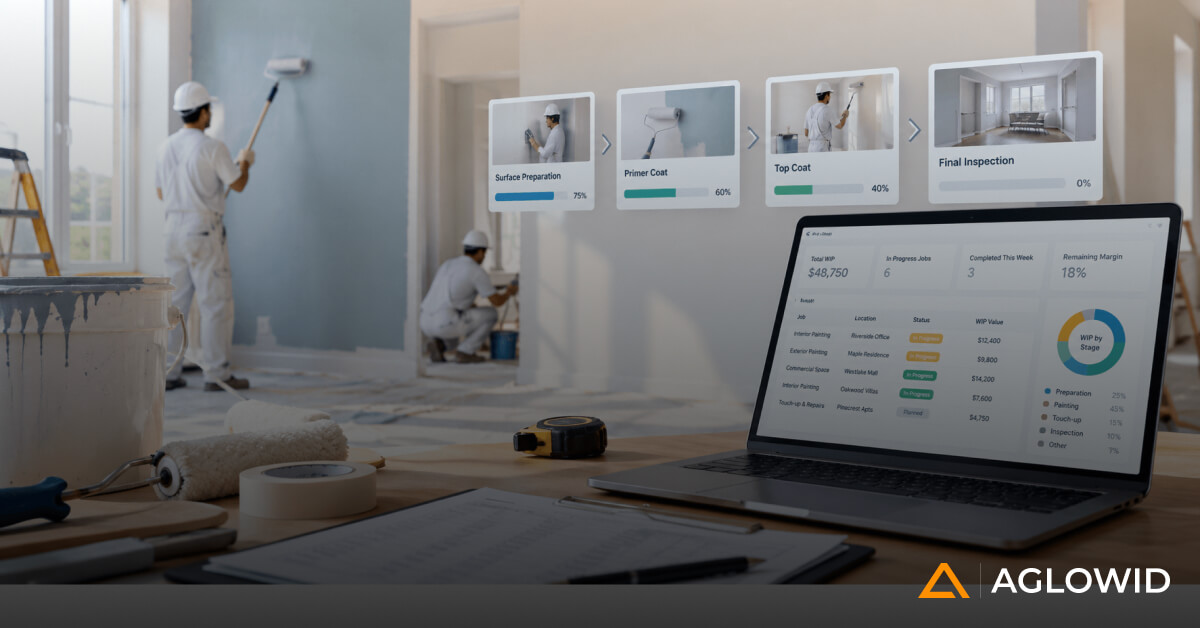
Quick Summary
Painting and coating contractors run on estimates, crews, materials, and job costs that all need to stay connected as a project moves forward. Odoo for painting and coating contractors is not a plug and play fix, it works when the platform is configured around how your business actually operates. This article walks through where Odoo genuinely fits, where standard Odoo falls short, and what to check before committing to an implementation
Painting and coating contractors do not run simple jobs. An estimate is built on labor hours, material quantities, surface area, and production assumptions. A project can look completely different by week two. Crews move between multiple active jobs. Materials need to be purchased against real project requirements, not guesswork. And by the time a job closes, the office needs to know whether it actually made money.
Most off the shelf software was never built around this reality. It handles one piece of the job (quoting, or scheduling, or invoicing) and leaves the rest for spreadsheets, group chats, and paper forms.
Odoo is not automatically the right fit for a painting or coating contractor. It becomes the right fit when it is configured around how the business actually operates.
That distinction is the point of this guide.
Why Painting and Coating Contractors Need More Than Generic ERP
No two weeks look identical on a painting or coating crew, but a few things happen on almost every active job, often at the same time, and often without much warning. An estimate that felt settled a week ago gets revised before the crew even arrives. A material order needs to go out against a project that has not been fully scoped in the system yet. And somewhere in the middle of all this, the office still needs a clear read on where each job actually stands.
Here is what a typical week looks like for a mid sized painting or coating contractor:
- An estimate goes out based on labor, materials, equipment, and production rate assumptions
- The customer approves it, then asks for two changes before the crew even shows up
- Three crews are working three different jobs, each at a different stage
- Materials need to be ordered against what each project actually needs, not a general stock guess
- At month end, someone has to figure out whether actual labor and material use matched the estimate
- Field updates trickle in late, through phone photos, a group chat, or a paper sheet that gets typed up two days later
- Accounting needs project-level numbers that are actually accurate, not reconstructed from memory
Individually, none of these problems are unusual. Together, they are exactly why generic project management tools or generic accounting software fall short. They solve one piece and leave the rest disconnected.
This is where the cost of disconnection becomes measurable, not theoretical. Industry research shows only 25 percent of construction projects land within 10 percent of their original budget, and the average project overrun sits between 28 and 33 percent. Estimating errors and disconnected cost tracking are consistently named as leading causes.
Odoo is relevant here because it is a platform, not a single tool. CRM, estimating, project management, purchasing, inventory, timesheets, field service, and accounting all live in one system. The value is not in having all of these pieces. The value is in connecting them around how a painting or coating contractor’s job actually flows from lead to closeout.
What Odoo Is and Why It Matters to This Industry
Odoo is a modular business platform, built from separate apps that can work independently or be connected together. Most contractors will never touch every module Odoo offers, and they shouldn’t try to. What matters is a specific, narrow set of modules that line up directly with the stages a painting or coating job actually moves through, from the first phone call to the final invoice.
The table below shows that pairing: which part of a contractor’s day-to-day workflow each Odoo module is built to handle.
| Contractor Workflow | Odoo Capability | What It Actually Handles |
|---|---|---|
| Lead management | CRM | Tracking incoming leads and opportunities before a quote exists |
| Estimate and proposal | Sales | Building and sending estimates, capturing customer approval |
| Project setup | Project | Turning an approved estimate into a structured job with phases |
| Material requirements | Purchase and Inventory | Ordering, receiving, and tracking materials and equipment |
| Crew time | Timesheets | Logging labor hours against a specific job |
| Field activities | Field Service | Daily updates, photos, and status from the crew on site |
| Job costs | Accounting and analytic accounting | Rolling up real costs against the project |
| Change orders | Sales and Project, customized | Capturing scope changes and their downstream impact |
| Invoicing | Accounting | Progress billing and final invoicing |
| Project profitability | Reporting | Comparing estimated to actual, project by project |
| Documents | Documents | Storing project files, photos, and customer approvals in one place |
Individually, none of these modules are unusual. CRM, project management, and accounting software all exist as standalone products, and plenty of contractors already use one or two of them. What’s different here is that all of them sit on the same data. A lead that turns into a job doesn’t need to be re-typed into a separate system. An approved estimate doesn’t need to be manually copied into a project tracker. A change order raised on site doesn’t sit in a text message until someone remembers to update the budget.
The value isn’t simply having all these modules. The value comes from connecting them around the contractor’s actual workflow.
That sentence is the thesis of this entire guide, and it is worth keeping in mind as each feature area is covered below.
How Odoo Fits the Painting and Coating Contractor Workflow
A painting or coating job typically moves through a consistent sequence:
Lead, Site Visit, Estimate, Proposal, Contract, Project Setup, Material Procurement, Crew Scheduling, Field Execution, Daily Updates, Change Orders, Progress Billing, Project Costing, Closeout.
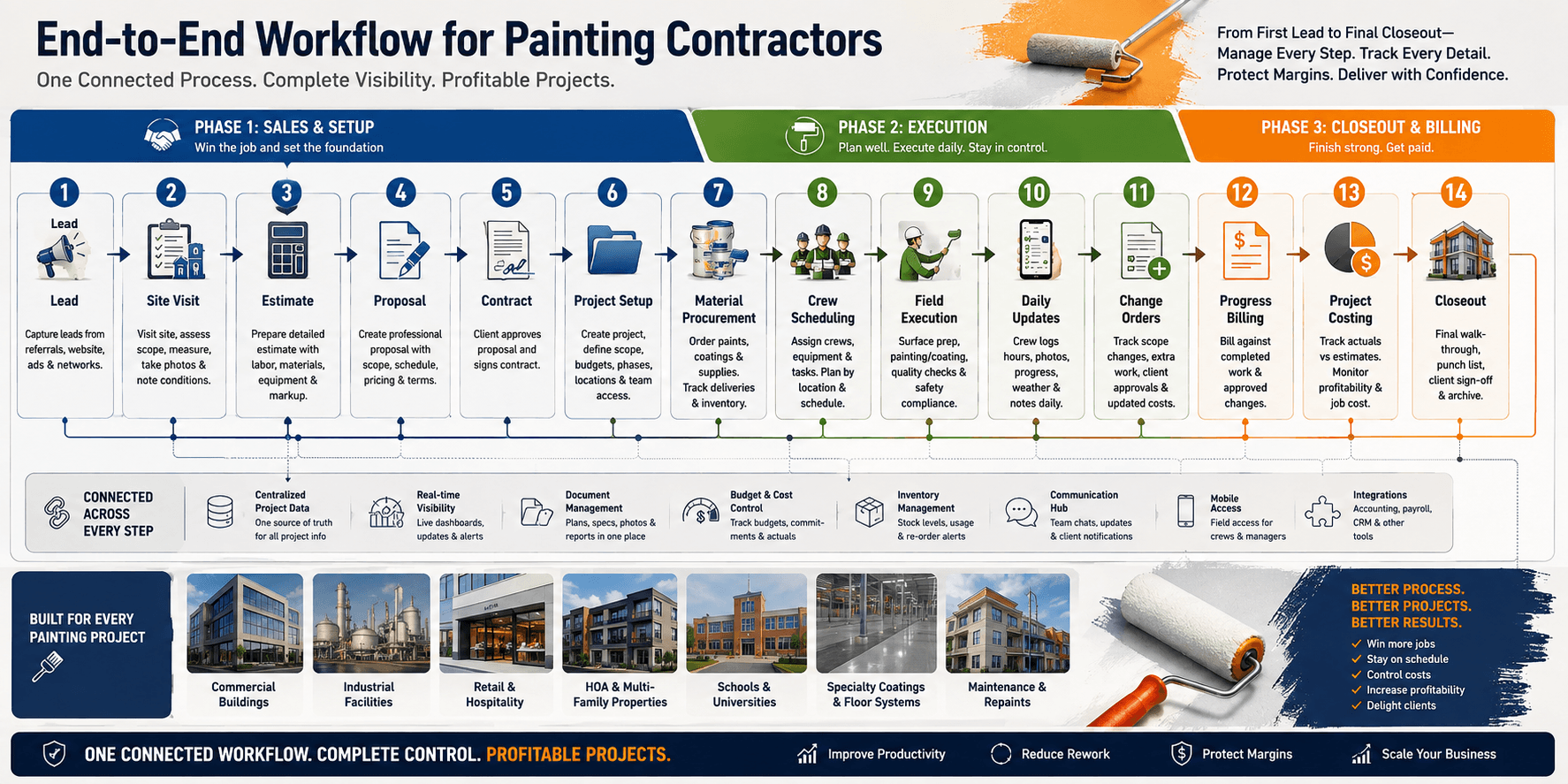
That sequence looks simple written out as a list. In practice, each stage is a handoff, and every handoff is a place where information can get lost, delayed, or re-entered by hand. This section walks through what typically happens at each stage, what tends to break without a connected system, and what changes when Odoo sits underneath the whole workflow.
Lead and Site Visit
A lead comes in by phone, referral, or a web form. Someone visits the site to take measurements, note surface conditions, and understand scope. In a disconnected setup, this information lives in a notebook or a text thread. In Odoo, the site visit notes attach directly to the CRM opportunity, so the person building the estimate later isn’t working from a secondhand summary.
Estimate and Proposal
The estimate gets built from labor, materials, equipment, and production rate assumptions, and goes out for approval. This is usually where spreadsheets take over in a disconnected setup, disconnected from everything that happens after. In Odoo, the estimate is a Sales record tied to the same customer and opportunity, so it doesn’t need to be rebuilt or re-typed once it’s approved.
Contract and Project Setup
Once approved, the estimate needs to become an active job with a budget, a timeline, and phases. This is the step most commonly done manually, or skipped entirely, in disconnected systems, which means the project starts with no real budget to measure against. In Odoo, the approved Sales order converts directly into a Project, carrying the estimate’s line items with it.
Material Procurement
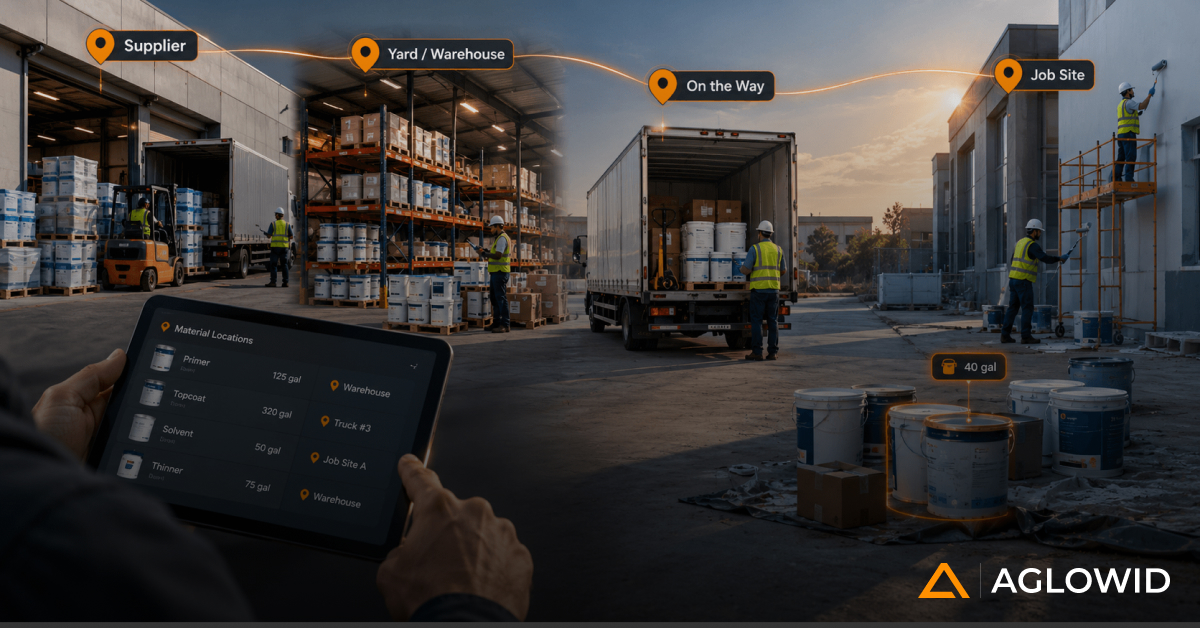
Materials get ordered against what the job actually needs; paint, primer, thinners, masking supplies, abrasives, and equipment. Without a system tying purchasing to the estimate, ordering is often based on habit or a rough guess, not the actual quoted quantities. In Odoo, purchase orders reference the same material lines the estimate was built on, so procurement and estimate stay aligned.
Crew Scheduling and Field Execution
Crews get assigned to jobs and the physical work happens: prep, primer, coats, and finish work. This is the stage furthest from the office, and historically the hardest to get accurate data from in real time.
Daily Updates
Hours worked, materials used, site conditions, delays, and photos need to make it back to the office. In a disconnected setup, this arrives late, arrives incomplete, or arrives through five different channels that nobody reconciles. In Odoo, Field Service and Timesheets capture this from a phone, on site, the same day the work happens.
Change Orders
Scope shifts mid-project, almost always. Without a documented process, changes get agreed to verbally and remembered inconsistently, which usually means either the customer disputes the bill or the contractor eats the extra cost. In Odoo, a change order updates the contract value, the project budget, and the billing schedule together, not in three separate conversations.
Progress Billing and Project Costing
Invoices go out, often in stages tied to project milestones, and actual costs need to be compared against the original estimate. This comparison is where disconnected systems fail hardest, because by the time someone manually pulls together labor, material, and subcontractor costs from separate sources, the job is already closed and the numbers are historical, not actionable.
Closeout
The job wraps, final documentation gets filed, and the project’s actual profitability becomes visible, or doesn’t.
The table below summarizes the risk at each stage without a connected system, and what changes with one.
| Workflow Stage | What Breaks Without a Connected System | What Odoo Changes |
|---|---|---|
| Lead and site visit | Site notes get lost or summarized secondhand | Notes attach directly to the CRM record |
| Estimate and proposal | Estimate lives in an isolated spreadsheet | Estimate is a Sales record tied to the customer |
| Contract and project setup | Project starts with no real budget | Approved estimate converts directly into a budgeted Project |
| Material procurement | Purchasing is guesswork, disconnected from the quote | Purchase orders reference the estimate’s material lines |
| Crew scheduling and execution | Office has no real-time visibility into site work | Field data ties directly to the project |
| Daily updates | Updates arrive late, incomplete, or scattered across channels | Field Service and Timesheets capture same-day data |
| Change orders | Scope changes are remembered, not documented | Change orders update contract, budget, and billing together |
| Progress billing and costing | Estimated vs actual comparison happens too late to act on | Actual costs are visible against budget while the job is still open |
| Closeout | Profitability is unclear or reconstructed after the fact | Project profitability is visible project by project |
Here’s what that looks like on an actual job. A commercial contractor quotes a three-coat exterior system on a 40,000 square foot facility. The estimate assumes a five-day crew schedule and a specific gallon count per coat. Two days in, the customer asks for an additional coat on the north face due to UV exposure concerns. In a disconnected setup, that request gets a verbal yes on site, the crew keeps working, and nobody updates the budget or the customer invoice until the project manager remembers, usually near closeout, if at all. In a connected system, the change order gets logged from the field, the estimate updates in real time, the customer sees a revised total before the extra coat goes on, and the material purchase order updates automatically to reflect the added gallons needed. The five extra hours of labor and the additional material cost show up in job costing immediately, not as a surprise at the end of the month.
This is the core argument for using a dedicated painting contractors ERP platform over a patchwork of point tools: not that any single feature is unique, but that the handoffs between stages stop losing information.
Check our Success Story
ERP Software for Painting & Coating Contractors
Centralizing Field, Finance, and Compliance with Odoo
Industry: Painting & Coating/Construction
Location: Canada
Odoo Features That Matter Most for Painting and Coating Contractors
Odoo has dozens of features. Most of them are irrelevant to this industry. These are the ones that actually matter.
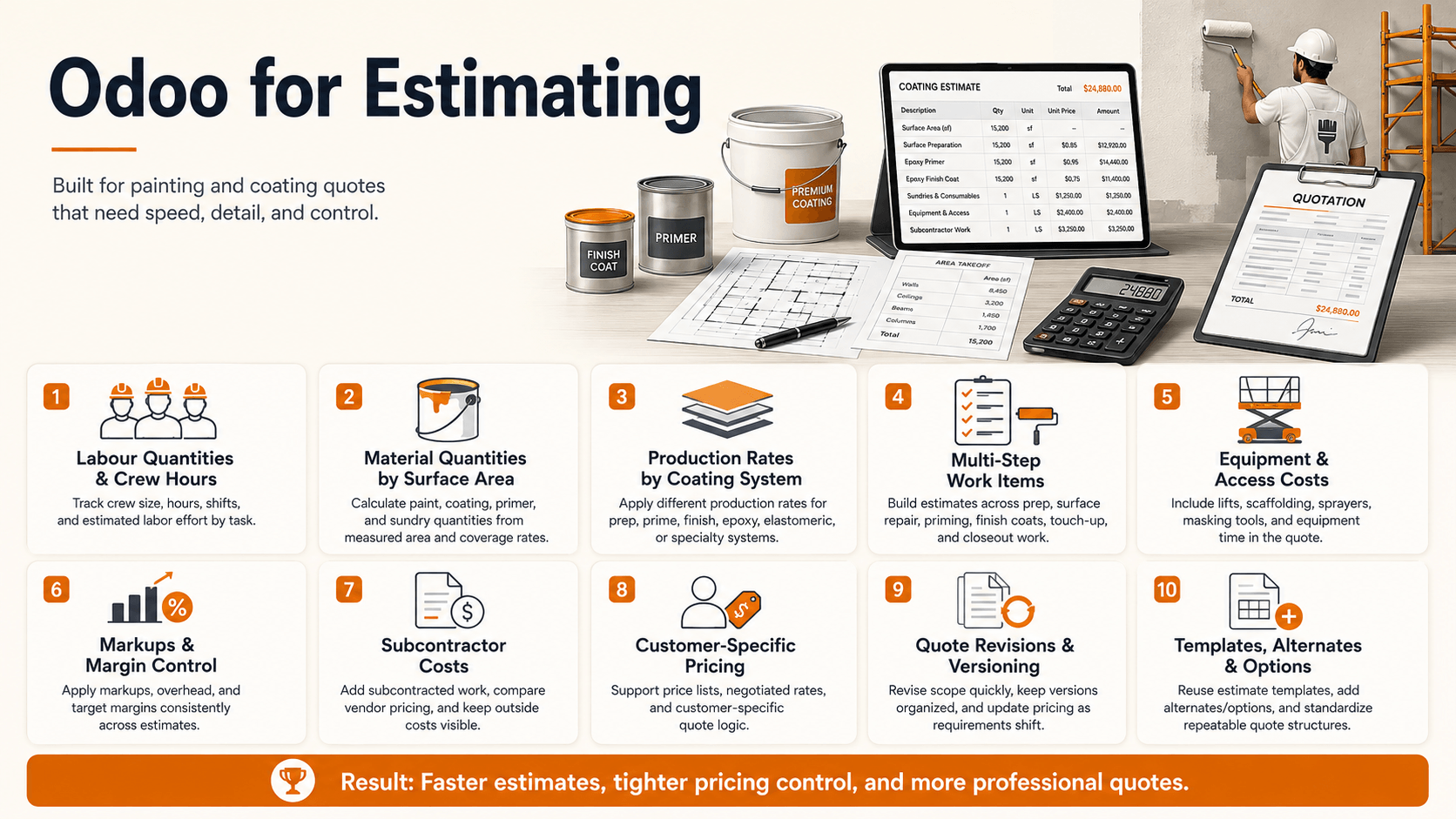
4.1 Estimating and Quoting
A painting or coating estimate is not a single line item. It is built from:
- Labor quantities and crew hours
- Material quantities, tied to surface area
- Production rates per coating system
- Multiple work items across a project (prep, prime, finish coats, touch up)
- Equipment costs
- Markups
- Subcontractor costs
- Customer-specific pricing
- Quote revisions as scope shifts
The important design point here: an approved estimate should not become a dead document. Once a customer signs off, that estimate should feed directly into project planning, material purchasing, and eventual job costing. If the estimate lives in one tool and the project lives in another, that connection breaks the moment the ink dries.
4.2 Project and Job Management
Contractors are rarely running one job at a time. Odoo Project supports multiple active projects, phases, work packages, crew assignments, milestones, documentation, and live status, all in one place.
For coating specifically, project phases usually map to something like:
Surface preparation, primer, intermediate coat, finish coat, inspection, touch-up, final completion.
Building these stages directly into project phases (instead of tracking them in a separate spreadsheet) means status is visible to the office without a phone call.
4.3 Material Management and Procurement
Painting and coating materials are specific: paints and coatings themselves, primers, thinners, consumables, abrasives, masking materials, safety supplies, equipment, and project-specific materials. Odoo’s Purchase and Inventory modules track purchase orders, receipts, and availability.
The real value shows up in the chain:
Estimate leads to material requirement, which leads to purchase, which leads to receipt, which leads to project usage, which leads to actual cost.
When that chain is intact, a contractor can see, project by project, whether material spend is tracking to what was quoted, not just whether the bank account looks healthy at month end.
4.4 Labor and Crew Tracking
Crew hours, subcontractor labor, job-specific timesheets, planned versus actual hours, overtime, and productivity all need to tie back to a specific project, and ideally to a specific work item within that project.
This detail matters because labor is usually the largest cost line on a painting or coating job, and it is the one most often lost to informal tracking. A crew that logs hours against “the job” instead of against a specific phase makes it impossible to tell whether prep work or finish coating is where the budget is bleeding.
4.5 Field Service and Daily Job Updates
This is where the difference between a generic ERP rollout and one built for this industry actually shows up.
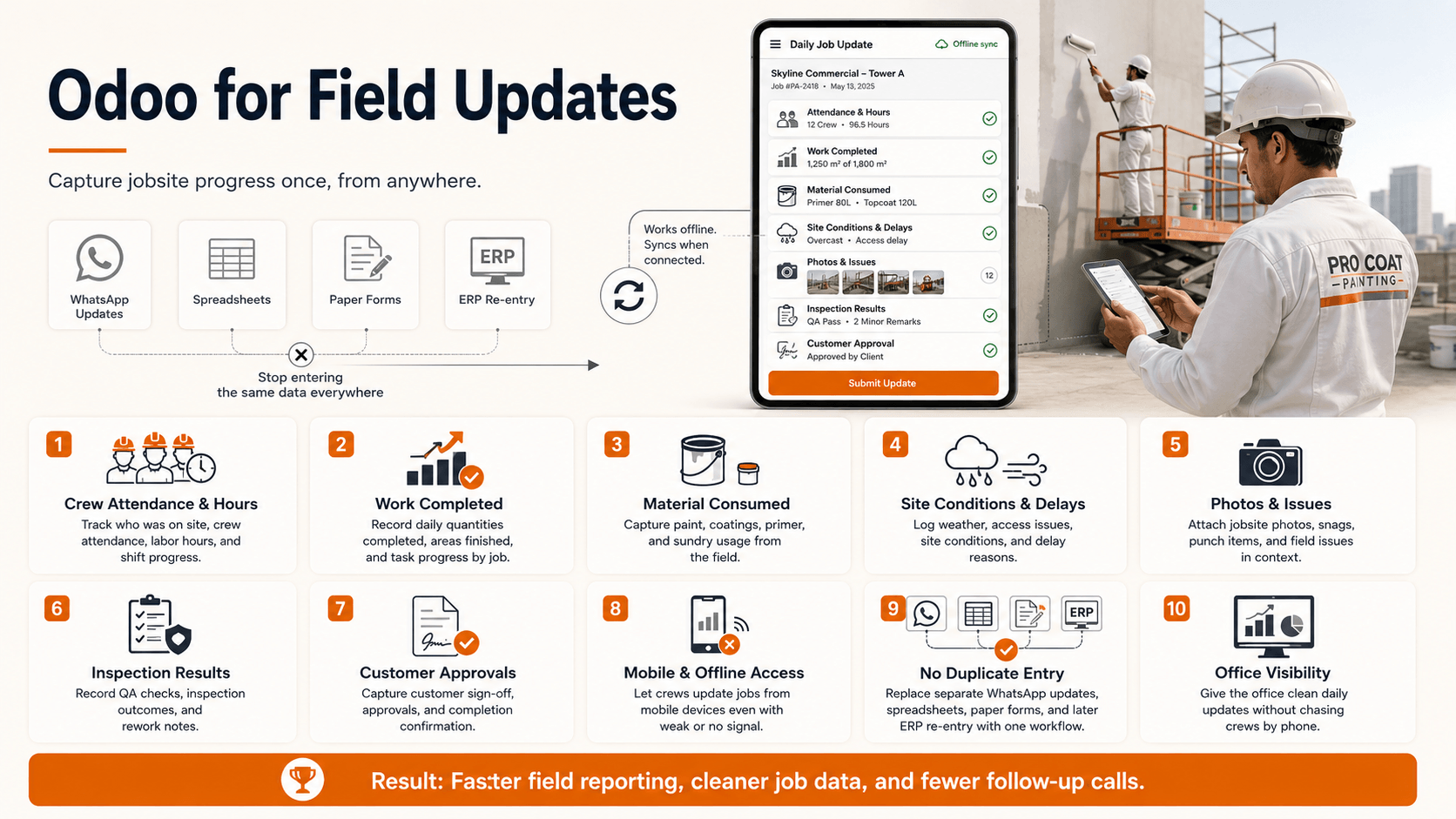
Field updates that matter day to day include crew attendance, hours worked, work completed, material consumed, site conditions, delays, photos, issues, inspection results, and customer approvals.
The field team should not need to enter the same information across WhatsApp, a spreadsheet, a paper form, and the ERP separately.
Mobile and offline access matters here more than almost anywhere else in the system. Painters and coating crews are not sitting at a desk. If the mobile experience is clunky or requires a constant signal, adoption fails, and the office is back to chasing updates by phone. Field service adoption in construction and real estate still lags other industries, sitting at roughly 37 percent, but that figure is projected to grow around 12 percent annually through 2028 as paper-based workflows keep digitizing. Contractors who get ahead of that curve are working with cleaner job data sooner than competitors still running on paper.
4.6 Change Orders
Painting projects change constantly, because of additional surface preparation, additional coats, changed specifications, unexpected site conditions, additional areas, customer requested changes, or material changes.
The chain that matters:
Change request leads to revised estimate, which leads to customer approval, which leads to project update, which leads to procurement and labor impact, which leads to billing.
If any link in that chain is manual and undocumented, either the customer gets billed for work that was never formally approved, or the contractor eats the cost of scope that was never captured. Neither outcome is good.
4.7 Job Costing and Profitability
This is arguably the most important section in this entire guide, because it is where software translates into money.
The comparison that matters across every project: estimated versus actual, for labor, materials, equipment, subcontractors, and any other project costs.
Once that comparison is reliable, a contractor can actually answer questions that usually get answered with a shrug:
- Which projects are profitable, and which aren’t
- Which jobs are running over budget, and by how much
- Where is labor exceeding the estimate
- Which materials are costing more than expected
- Which crews are most productive
- Where are margin leaks actually happening
A company that can nail the estimate process and keep a project running on budget has an enormous advantage over the competition.
That is not a software marketing line. It reflects a real industry pattern: cost overruns tied to estimating errors and poor cost visibility are widespread across construction, and painting and coating work is not exempt.
Different Business Models, and What Fits Best for Each
The workflow covered in the last two sections applies broadly, but how it should actually be configured depends heavily on the type of contractor running it. Here is what tends to fit best for each, and where the real complexity usually sits.
Commercial Painting Contractors
Large projects, multiple crews, progress billing, and heavier material procurement volume.
- Configuration priority: project phasing and progress billing tied to milestones
- Why: a single job can span weeks with several crews working different phases at once
- Also needed: Purchase and Inventory set up for procurement at volume, not one-off orders
Industrial Coating Contractors
Complex specifications, coating systems, inspections, documentation, equipment, and compliance requirements.
- Configuration priority: Documents and Field Service, structured around inspection checkpoints
- Why: clients on this kind of work usually expect a documented paper trail, not just a finished result
- Also needed: compliance records built into the project file, not tracked separately
Residential and Smaller Contractors
Simpler estimating, scheduling, invoicing, and customer management, without the overhead a large commercial setup would require.
- Configuration priority: a lean subset of Odoo, Sales, Project, and Accounting only
- Why: overbuilding the system here creates more admin work than it saves
- Also needed: deliberately skip the heavier procurement and compliance configuration a commercial or industrial setup would need
Specialty Coating Contractors
Floor coatings, waterproofing, protective coatings, fireproofing, and similar work.
- Configuration priority: a custom estimating template per coating system
- Why: generic surface-area based quoting rarely captures material and application differences
- Example: a waterproofing membrane and a fireproofing spray application quote very differently, even on similar square footage
None of this is something you can accurately judge from a blog post, including this one. The right configuration depends on how your specific business actually operates, not just which category it falls into on paper. A commercial contractor doing mostly small tenant improvement jobs looks very different from one running large ground-up builds, even though both fall under “commercial.” That distinction only becomes clear through an actual review of your workflow, not a generic checklist.
Not Sure Which Setup Fits Your Business?
Every painting and coating contractor runs jobs a little differently, and the right Odoo configuration follows from that, not the other way around. A short workflow review will tell you more than any generic guide can.
The market these contractors operate in is not small. The U.S. paints and coatings market was valued at roughly USD 31.78 billion in 2024, with growth projected at a 4.5 percent CAGR through 2030, according to Grand View Research. That is a lot of project volume moving through spreadsheets and paper forms across the industry.
Where Standard Odoo May Not Be Enough for Painting Contractors
No credible guide should claim standard, out of the box Odoo covers everything a painting or coating contractor needs. It usually doesn’t. The areas that typically need work fall into a few natural groups, not a random list.
Estimating and Quoting
Standard Odoo Sales handles line-item quotes well, but it doesn’t natively understand a painting or coating estimate. Production rate calculations, surface-area based quoting, and coating system definitions (how many coats, what primer goes with what finish) usually need to be built as custom fields, pricelists, or product configurations layered on top of the standard Sales app.
Project and Job Structure
Odoo Project is flexible, but it ships built for generic task management, not for a job that moves through prep, primer, and finish coats as distinct, billable phases. Work-item structures tied to project phases, and job costing views that reflect this industry rather than generic manufacturing, are close to always a configuration project, not a toggle in settings.
Field and Crew Operations
Crew productivity tracking and field reporting tailored to painting and coating tasks (surface conditions, weather delays, coats applied per day) go beyond what a generic Field Service setup captures out of the box. This is usually the area with the most custom fields and forms, since it is also the area furthest from how Odoo’s default templates were designed.
Change Orders and Billing
Change order workflows and progress billing structures are two of the most commonly underestimated customization areas. Standard Odoo doesn’t have a built-in “change order” object that updates a contract, a budget, and a billing schedule together. It typically needs to be built using Sales order revisions or a custom module, depending on how much automation the contractor needs.
Material Planning
Project-specific material planning, tying purchase orders directly to an individual project’s estimate lines, usually requires configuration of analytic accounts or project-linked purchasing rules, since standard Purchase and Inventory are not project-aware by default.
The table below summarizes where the effort tends to concentrate.
| Area | Standard Odoo Covers | Usually Needs Configuration or Customization |
|---|---|---|
| Estimating | Basic line-item quoting | Production rates, surface-area quoting, coating systems |
| Project structure | Generic task and phase tracking | Painting-specific phases and job costing views |
| Field operations | Basic field service logging | Crew productivity and industry-specific field reporting |
| Change orders | Sales order revisions | A structured change order workflow tied to budget and billing |
| Material planning | General purchasing and inventory | Project-linked material planning tied to the estimate |
For industrial coating contractors specifically, there is also a compliance layer worth planning for: OSHA requirements, VOC regulations, confined space protocols, and respiratory protection documentation. None of this exists in standard Odoo at all. Clients on industrial and commercial projects often expect this documentation to exist in the project record, not as an afterthought, and it typically gets built as a checklist or document requirement attached to project phases rather than a dedicated compliance module.
Odoo provides the ERP foundation. Industry-specific configuration is what makes it useful for painting and coating operations.
This is a more honest, and ultimately more useful, way to think about the platform than treating it as a plug and play solution.
Odoo vs Generic Construction and Project Management Software for Painting Contractors
Contractors evaluating Odoo are usually also looking at dedicated construction management software or project management software, tools built specifically for the construction industry, like Procore, Buildertrend, or similar platforms. Here is a balanced comparison, not a sales pitch, because the honest answer is that neither option is universally better.
| Requirement | Generic Project Software | Odoo |
|---|---|---|
| CRM | Usually included | Yes |
| Estimating | Varies by platform | Configurable |
| Project management | Yes | Yes |
| Purchasing | Often limited | Yes |
| Inventory | Varies | Yes |
| Accounting | Often integrated separately | Yes |
| Job costing | Varies | Configurable |
| Field operations | Varies | Available and configurable |
| Custom workflows | Limited to strong, depending on platform | Highly configurable |
| Industry-specific workflows | Often predefined | Usually configured or customized |
A few of these rows are worth unpacking, since the table alone can flatten real differences. Construction-specific platforms often come with predefined workflows for job costing and field operations already built for the trade, which can mean faster setup with less configuration effort up front. What they usually lack is native purchasing, inventory, and accounting depth, which is why many contractors end up bolting on a second system for financials anyway, and then reconciling two systems by hand. Odoo goes the other direction: purchasing, inventory, and accounting are native and connected from day one, but the painting and coating-specific workflows (estimating logic, coating systems, field reporting) are not predefined. They have to be configured, as covered in the previous section.
The right choice depends less on the number of features and more on how closely the system can support your actual operating model.
In practice, this comes down to one question: would you rather start with industry-specific workflows and add financial depth later, or start with financial and operational depth and add industry-specific workflows on top? A platform with fewer built-in construction-specific features but stronger configurability can end up being a better long-term fit than a construction-specific tool that cannot flex to how a particular contractor actually runs jobs. The reverse is also true for a contractor who needs to be operational fast and has simpler financial needs. This is a fit question, not a feature count question, and it’s worth answering honestly before signing a multi-year contract with either type of platform.
What to Look for in an Odoo Implementation for Painting Contractors
Most contractors evaluating an Odoo implementation partner ask about price and timeline first. Those matter, but they’re not what actually separates a good fit from a costly mistake. The six questions below are.
Industry Workflow Mapping
Does the implementation team understand how painting and coating jobs actually run, or are they mapping your business onto a generic manufacturing template? A green flag is a team that asks about your coating systems and production rates before they open the software. A red flag is a team that starts configuring before they’ve asked how a job actually moves from estimate to closeout in your business.
Estimating Structure
Can estimates flow into projects, purchasing, and costing without manual re-entry? If the answer involves someone re-typing an approved quote into a separate project record, the core problem this article opened with hasn’t actually been solved. It’s just been moved into new software.
Data Structure
Are customers, products, materials, work items, employees, and projects structured in a way that will actually hold up as the business scales? Data structure mistakes made in month one are usually invisible in month one and expensive in year two, once hundreds of projects are built on a foundation that needs to be rebuilt.
Field Adoption
Can crews use the system on a phone, on site, without creating more admin work than the paper process it replaces? This is the single most common point of implementation failure in this industry specifically. A system the office loves and the field ignores produces the exact same disconnected, unreliable data the business had before, just inside more expensive software.
Job Costing
Can management actually see estimated versus actual costs, by project, without exporting to a spreadsheet first? If getting a real answer to “is this project profitable” still requires a spreadsheet at the end, the implementation stopped short of the part that actually matters.
Integrations
Does the system need to connect with payroll, banking, accounting, customer portals, other field tools, document systems, or reporting? Get this mapped out before implementation starts, not discovered mid-project when a workaround is already needed.
The test that ties all six together: can management get project-level profitability without manually manipulating spreadsheets? If the answer is no, the implementation is not finished, regardless of what the invoice says.
This due diligence step matters more than it might seem, because the failure rate on ERP projects generally is not small. Gartner research indicates more than 70 percent of ERP implementations fail to reach their original business case goals. Most of those failures trace back to unclear objectives and a mismatch between the implementer’s experience and the business’s actual workflow, not the software itself, which is exactly why the six questions above matter more than any feature list a vendor can hand you.
How Much Does Odoo Cost for a Painting Contractor
This is usually the first question a contractor actually wants answered, and the one guides tend to dodge with vague ranges. There is no single honest universal number, and any guide that gives you one flat figure is oversimplifying. What’s more useful is understanding what actually drives the cost, so you can size your own project instead of anchoring on someone else’s number.
| Cost Driver | Why It Moves the Number |
|---|---|
| Number of users | More licenses, and often more complex permission and workflow setup |
| Odoo edition | Standard covers most SMB needs; Custom is needed for multi-company setups or deeper API access |
| Modules needed | Three modules configured well costs far less than eight modules configured poorly |
| Customization level | The estimating, job costing, and field reporting work covered in Section 6 is where most of the real cost lives |
| Integrations | Payroll, banking, and existing tools each add setup and testing time |
| Data migration | Clean data from an existing system migrates fast; years of inconsistent spreadsheets do not |
| Reporting requirements | Standard dashboards are included; custom profitability reports are configuration work |
| Training | Office and field users usually need separate training tracks, which takes time either way |
| Ongoing support | A support contract or in-house admin capacity, either way this is a recurring cost, not a one-time one |
As a general point of reference, and not a quote, small operations configuring a handful of core modules with light customization tend to land toward the lower end of the market, while larger contractors adding heavier customization, multiple integrations, and complex data migration land considerably higher. Where any specific project falls depends entirely on the drivers in the table above, which is exactly why a real scoping conversation matters more than a published price list.
Odoo subscription cost is not the same as total ERP implementation cost.
The subscription is often the smallest line item in the total investment. Configuration, customization, data migration, and training are usually where the real cost lives, and where the real value gets built. This mirrors what shows up across ERP projects broadly, where cost overruns and underestimated implementation complexity are consistently named as leading causes of project frustration.
The more useful question isn’t “what does Odoo cost,” it’s “what does staying on the current setup cost.” A contractor running estimates in a spreadsheet, purchasing without checking against the quote, and reconstructing job costs after the fact is already paying for that disconnection, just not in a single line item. It shows up in margin leaks that are hard to trace and jobs that quietly lose money without anyone noticing until closeout.
What to Ask Before Choosing Odoo for Painting Contractors Business
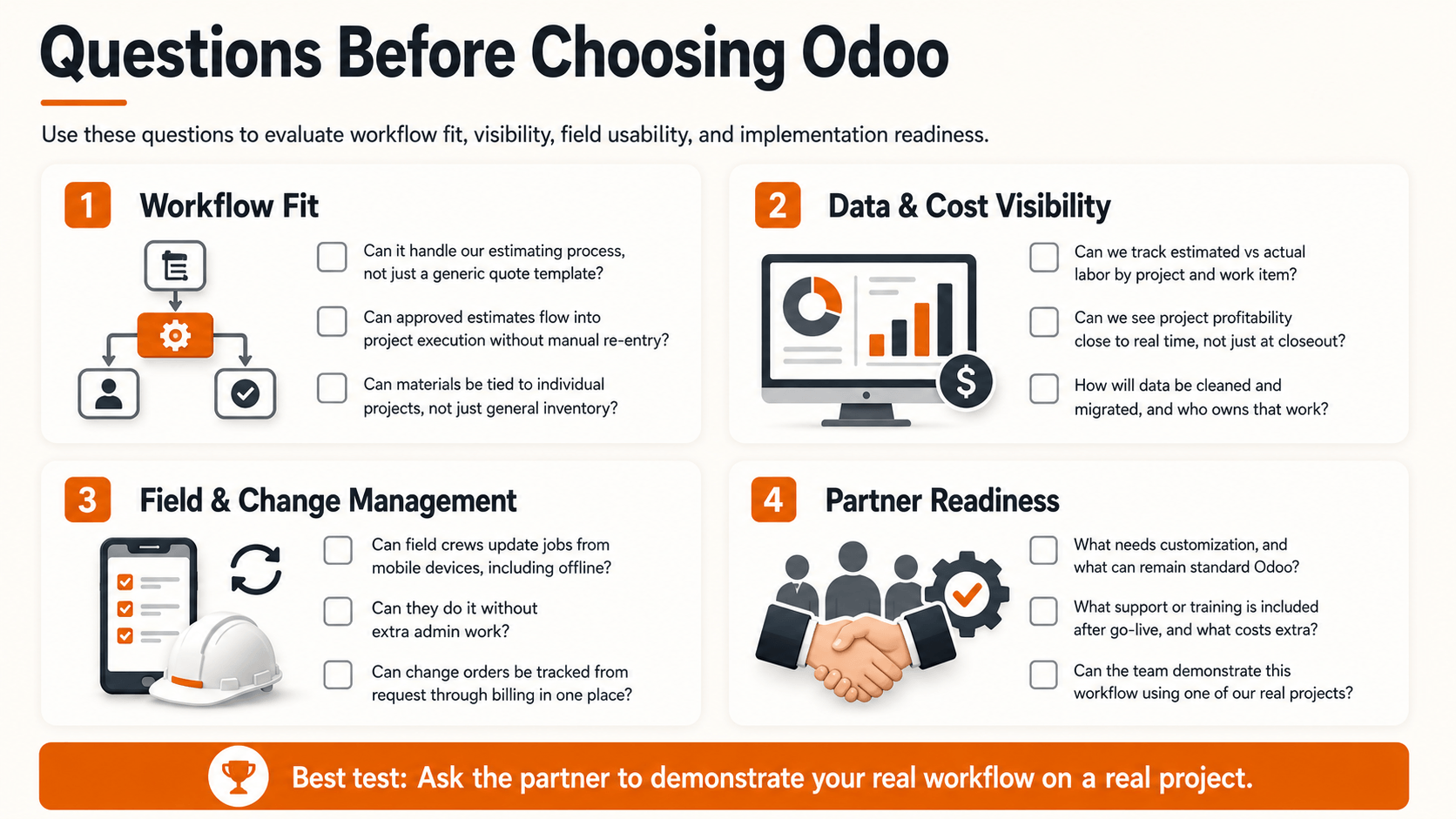
Before committing to an Odoo implementation, get clear answers to the questions below. They’re grouped into four areas, since a scattered checklist is easy to skim past and easy to forget mid-conversation with a sales team.
Workflow fit
- Can the system handle our estimating process, specifically, not a generic quoting template?
- Can approved estimates flow into project execution without manual re-entry?
- Can materials be tied to individual projects, not just tracked in general inventory?
Data and cost visibility
- Can we track estimated versus actual labor, by project and by work item?
- Can we see project profitability in something close to real time, not just at closeout?
- How will our existing data be cleaned and migrated, and who owns that work?
Field and change management
- Can field crews update jobs from mobile devices, including offline, without extra admin work?
- Can change orders be tracked properly, from request through billing, in one place?
Implementation partner readiness
- What needs customization, and what can remain standard Odoo?
- What ongoing support or training is included after go-live, and what costs extra?
- Can the implementation team demonstrate this workflow using one of our real projects, not a generic demo?
That last question is the one that separates a serious implementation partner from a vendor reading off a feature list.
Conclusion
Odoo isn’t valuable to a painting or coating contractor simply because it has CRM, accounting, inventory, and project management. It becomes valuable when those capabilities are connected around the contractor’s actual workflow: lead to estimate, estimate to project, project to procurement, procurement to field execution, field execution to costing, and costing to real, visible profitability.
The industry employed over 242,000 people in the U.S. house painting and decorating contracting segment as of 2023, and the broader U.S. paints and coatings market continues to grow year over year. That growth means more competition, and more pressure on the contractors still running their operations across five disconnected tools and a stack of paper job sheets.
The company that can nail the estimate process and keep a project running on budget has an enormous advantage over the competition.
If your estimates are disconnected from your projects, your projects are disconnected from your purchasing, and your job costing happens two weeks after the invoice already went out, that is not a software problem you can outgrow. It’s a structural one, and it’s worth fixing before the next busy season, not during it.
Ready to see what this actually looks like for your business? Talk to a team that understands painting and coating workflows, not just generic ERP configuration, and get a walkthrough built around one of your real projects.