
Quick Summary
Growing Painting contractors often hit a point where adding crews creates more chaos instead of more profit, and the real fix usually is not another hire, it is better visibility into the crews already on payroll. This blog breaks down how crew scheduling software for painting contractors reduces idle time, controls overtime, protects job margins, and helps owners scale without losing control of daily operations. Whether you are running three crews or fifteen, the goal is the same: turn scheduling from a daily guessing game into a system the whole team can trust.
Painting businesses hit a wall that has nothing to do with sales. It shows up in the schedule. A contractor who once ran two crews off a whiteboard now runs six, and the whiteboard, the group text, and the owner’s memory can no longer keep up. This is where crew scheduling software for painting contractors becomes less of a convenience and more of an operating requirement.
The strain is not unique to painting. Across the wider trades, coordination failures are one of the biggest hidden costs of growth. Large construction projects typically run 20 percent over schedule and up to 80 percent over budget, and poor coordination is a primary driver of both numbers. Painting contractors feel a smaller, faster version of that same problem every week: a crew shows up to a job that is not ready, another crew sits idle because nobody knew they were free, and the owner ends up rebuilding the week’s schedule from scratch on a Sunday night.
Stats says – The U.S. painting industry is valued at roughly $49.0 billion in 2026, growing at a 2.2 percent compound annual rate since 2021, while the broader construction workforce shortage is forcing every trade to get more output from the crews they already have.
This is not actually a new problem, even if the scale feels new. In the early 1900s, engineer Henry Gantt introduced a simple visual timeline, now known as the Gantt chart, so managers could see at a glance who was working on what and when. The idea proved its value during World War I, when it was used to coordinate shipbuilding schedules across multiple crews and production lines at once. More than a century later, painting contractors are running into a version of the same core challenge Gantt was trying to solve, just spread across job sites and crews instead of a single shipyard.
This article walks through why scheduling becomes harder as a painting business grows, what it actually costs to keep managing crews manually, how dedicated scheduling software changes both operations and profitability, and what to look for when you are ready to make the switch.
Why Crew Scheduling Becomes Harder as Painting Contractors Grow
A two crew painting company can run on instinct. The owner knows who is free, who is close to the next job, and who is good with cabinetry versus exterior siding. That instinct does not scale. Somewhere between four and eight crews, the mental model breaks down, and it breaks down in predictable ways.
Multiple crews and overlapping jobs
Every additional crew multiplies the number of scheduling combinations, not adds to them. With three crews and five active jobs, there are dozens of ways assignments could go wrong: two crews sent to the same address, a crew scheduled for a job that has not been prepped, or a crew double booked across two clients on the same afternoon.
Changing project timelines and weather disruptions
Painting is one of the most weather sensitive trades in construction. A single rained out exterior day does not just delay that job, it pushes every job scheduled behind it, and someone has to manually work out the new order.
Crew availability, skills, and travel constraints
Not every crew can do every job. Cabinet refinishing, high end interior finishes, and large commercial repaints all require different skill sets. Add in travel time between job sites and personal time off, and a manager is now solving a constraint problem in their head, several times a day.
Limited visibility into actual capacity
Growing contractors often cannot answer a simple question: which crews have room for another job this week? Without a centralized view, the honest answer is usually a guess.
The challenge is not creating a schedule. It is maintaining a reliable schedule when the variables affecting it change every single day.
The Real Cost of Manual Scheduling
Most painting contractors do not think of their scheduling method as a cost center. It is treated as an administrative task, something the office manager or the owner just handles. But manual scheduling has a real, measurable cost, and it grows in direct proportion to the number of crews you run.
Only about 35 percent of construction companies currently use dedicated scheduling software, which means the majority are still coordinating crews through spreadsheets, phone calls, and text threads that break down as the business scales. Idle crew time alone costs construction companies between $50 and $150 per worker per day once wages, benefits, and lost productivity are factored in. For a five person crew sitting idle for even half a day, that is real money leaking out of a job that already had thin margins to begin with.
| Cost driver | Manual scheduling (spreadsheets, whiteboards, texts) | Dedicated scheduling software |
|---|---|---|
| Crew idle time | Often invisible until payroll is reviewed | Flagged in real time, reassigned same day |
| Double bookings | Discovered on site, after the crew is already dispatched | Prevented before the schedule is published |
| Rescheduling after weather or delays | Manually rebuilt job by job, often after hours | Rebuilt in minutes with automatic conflict checks |
| Owner or manager time spent scheduling | Several hours per week, growing with crew count | A fraction of that time, spent reviewing exceptions |
| Visibility for office and field | Fragmented across texts, calls, and paper | Centralized and shared across the team |
Painting contractor payroll expenses already average 28 percent of revenue, with cost of goods sold making up another 35 percent as per the study. When labor is that large a share of the cost structure, the hours lost to poor coordination are not a minor inefficiency. They are a direct hit to a margin that is already tight, given that painting contractor profit margins average just 6.1 percent.
“We were not losing jobs because of price. We were losing money on the jobs we already won, because two of our crews were sitting around while a third one worked overtime.” This is a composite of the frustration many growing painting contractors describe once they start tracking idle hours against payroll.
How Crew Scheduling Software Improves Painting Operations
This is where dedicated software or a custom painting contractors erp earns its place in the business. It does not replace the judgment of an experienced scheduler, it gives that person a system that can hold more information than a whiteboard or a phone ever could. In effect, it does what Henry Gantt’s original chart set out to do more than a hundred years ago: put every crew, every job, and every timeline on one shared view that the whole team can see and trust, just built for the pace and scale of a modern painting business instead of a wartime shipyard.
Centralizes crew availability and job schedules
A single, shared view of which crews are available, which are already assigned, who has time off booked, and what commitments are already locked in for the coming weeks. Instead of a manager holding this in their head, it lives in one place that anyone on the team can check.
Assigns the right crew to the right job
Good scheduling software matches jobs to crews based on crew size, skill set, project type, any specialized work required (like faux finishes or commercial spray work), and location. This turns crew assignment from a guess into a filtered decision.
Prevents scheduling conflicts and crew over-allocation
The system flags double bookings, unrealistic workloads, and excessive overtime before they happen, rather than after a crew has already been sent to the wrong site. It also surfaces idle crews so managers can fill gaps instead of letting them go unnoticed.
Makes schedule changes easier to manage
Weather delays, job overruns, customer access issues, crew absences, and material delays are a normal part of painting work. Scheduling software lets a manager adjust the plan in minutes and push updates to everyone affected, instead of manually calling each crew lead.
Keeps office and field teams aligned
Shared schedules, real time updates, and automatic crew notifications close the communication gap between the office, the foremen, and the crews on site. Everyone is working from the same version of the plan.
Check our Success Story
ERP Software for Painting & Coating Contractors
Centralizing Field, Finance, and Compliance with Odoo
Industry: Painting & Coating/Construction
Location: Canada
How Better Scheduling Protects Painting Job Profitability
Productivity gains are useful, but the real argument for scheduling software is what it does for the bottom line. This is the section that separates scheduling as a nice to have from scheduling as a profit protection tool.
Reduces crew idle time
Unused labor capacity is one of the most expensive things a painting contractor can carry. A crew that is paid but not producing is a direct loss, and it compounds across every idle hour, every week.
Picture a five person crew that shows up to a job site and has to wait half a day because the previous trade has not finished, or because the schedule sent them to a job that was not actually ready yet. At the $50 to $150 per idle worker day range cited earlier, that single half day of waiting can cost a contractor somewhere between $125 and $375 in wasted labor for that one crew alone. Multiply that across a handful of idle days a month, across every crew a growing contractor runs, and the number stops looking like a rounding error and starts looking like a line item worth managing on its own.
Controls overtime and labor overruns
Poor scheduling is one of the most common, and most avoidable, drivers of unnecessary overtime. When a manager cannot see the full picture of crew workloads, they end up leaning on the crews they trust, which pushes those crews into expensive overtime hours while others sit underused.
This pattern is easy to miss because it looks like loyalty to a strong crew rather than a scheduling failure. In practice, it means the business pays a premium, typically time and a half, to keep one crew running late, while another crew’s regular hours go unused a few miles away. Over a full year, the gap between overtime paid on one side and idle capacity sitting on the other can add up to close to an entire extra crew’s worth of wages, without an extra crew’s worth of output to show for it
Improves planned versus actual labor visibility
Scheduling software lets contractors compare scheduled hours against actual hours worked, job by job. This single comparison often exposes exactly where estimates are too optimistic or where a specific job type consistently runs long.
For example, if a cabinet refinishing job is consistently estimated at 20 labor hours but consistently takes 25, that is not a one off problem, it is a pattern the estimating team can and should correct. Without job level, planned versus actual visibility, that pattern stays invisible, and every future cabinet job gets bid at a loss before the crew even shows up.
Connects scheduling with job costing
This is the section that ties everything together: scheduling drives labor hours, labor hours drive job cost, and job cost drives gross margin.
Scheduling → Labor hours → Job cost → Gross margin
Here is a simplified, illustrative example of how that chain plays out on a single mid sized repaint job, comparing a contractor coordinating manually against one using connected scheduling and job costing software.
| Stage | Manual scheduling (illustrative) | Connected scheduling software (illustrative) |
|---|---|---|
| Estimated labor hours | 120 hours | 120 hours |
| Actual hours worked | 150 hours, idle time and overtime absorbed the gap | 128 hours, a small and expected variance |
| Labor cost | Roughly $4,700 | Roughly $3,750 |
| Material and overhead cost | $3,000 | $3,000 |
| Total job cost | $7,700 | $6,750 |
| Contract price | $9,000 | $9,000 |
| Gross margin | 14.4 percent | 25.0 percent |
The contract price does not change in this example, and neither does the scope of work. The only variable is how tightly labor hours were managed against the plan, and that alone is the difference between a job that barely breaks even and one that hits a healthy margin.
The results from real implementations back this up directionally. In a documented case, a contractor that implemented advanced scheduling software alongside real time workforce tracking reduced idle time by 20 percent, cut overtime costs by 15 percent, and completed projects 10 percent faster . Companies that adopt dedicated scheduling tools also report up to a 30 percent reduction in scheduling related delays within the first 90 days of use.
Scheduling data becomes far more valuable once it is connected to time tracking, estimating, job costing, payroll, and accounting or ERP systems. On its own, a schedule tells you where crews are supposed to be. Connected to the rest of the business, it tells you whether the job is actually making money.
Using Crew Scheduling to Increase Capacity Without Immediately Adding Crews
Growing contractors default to the same solution when work picks up: hire another crew. That is sometimes the right call, but often it is treating a symptom rather than the cause.
Better scheduling gives contractors visibility into:
- Current crew capacity across every active job
- Underutilized crews that could absorb more work
- Overloaded crews that are running consistent overtime
- Available capacity for new projects without adding headcount
- Whether additional hiring is actually necessary, or whether the existing team is simply misallocated
Consider a composite example based on patterns common among growing contractors. Coastal Pro Painting runs eight crews. On paper, the owner assumed they were near full capacity and started interviewing for crew number nine. Once they mapped actual utilization against the schedule, they found one to two crews were consistently running below capacity most weeks, not because of a lack of work, but because scheduling gaps meant jobs were being routed unevenly. The ninth hire was put on hold. Instead, the owner restructured how jobs were assigned across the existing eight crews and recovered the equivalent of almost a full crew’s worth of output within two months.
The point is not that software magically creates capacity. It makes existing capacity visible and usable.
This distinction matters more than ever given the labor market painting contractors are hiring into. According to Associated Builders and Contractors, via Construction Dive the construction industry needs roughly 349,000 net new workers in 2026 alone just to keep pace with demand, on top of normal hiring ), and nearly 41 percent of the current construction workforce is expected to retire by 2031 – Buildertrend. Every crew a contractor can fully utilize without hiring is a crew they do not have to find in an already strained labor pool.
When Should a Painting Contractor Invest in Crew Scheduling Software?
Scheduling software becomes worth the investment when the day to day reality starts to look like this:
You’re managing multiple crews simultaneously
Once you are past two or three crews, the mental math required to schedule well grows faster than most people expect. With two crews, there is basically one decision to make each morning: who goes where. With six or seven crews, each with different skills, different job types, and different locations, that same decision becomes dozens of interlocking combinations, and it has to be solved fresh every single day. Most owners do not notice the shift happening, they just notice that scheduling has quietly become the hardest part of their week.
Schedules are constantly being rebuilt
If your team spends more time redoing the schedule than executing it, the current process has already broken down. A telltale sign is the Sunday night or early Monday morning scramble, rebuilding the whole week because something changed on Friday. When the schedule cannot absorb a single change without a full rebuild, it is not really a schedule anymore, it is a guess that gets thrown out every few days.
Crew availability isn’t visible in one place
If answering “who is free this week” requires several phone calls, that is a visibility problem, not a staffing problem. Contractors in this position often have enough labor capacity to take on more work, they simply cannot see it fast enough to say yes with confidence. That hesitation costs jobs just as surely as being genuinely short staffed would.
Jobs frequently run beyond planned dates
Consistent overruns are often a scheduling and capacity issue disguised as a production issue. It is easy to blame a slow crew or a difficult client, but if overruns are happening across multiple crews and multiple job types, the more likely cause is that jobs were never realistically scheduled against actual crew capacity in the first place.
Overtime and idle time are increasing
Rising overtime alongside rising idle time, at the same time, is one of the clearest signs that crew allocation is broken. It means labor is being misallocated, not that there is too much or too little of it. A business paying overtime on one crew while another sits underused is effectively paying twice for the same output.
Customers frequently ask for schedule updates
If your team is constantly fielding “when will you be here” calls, your internal visibility gap has become a customer facing problem. Once customers start managing your schedule uncertainty for you, by calling in, following up, or rearranging their own day around your unpredictability, it is actively working against your reputation and referral pipeline.
Scheduling decisions depend heavily on one person
This is a business risk, not just an efficiency issue. If one person, often the owner, carries the full picture of crew skills, job status, and timing in their head, the business has a single point of failure. A sick day, a vacation, or an unexpected departure does not just slow things down, it can bring scheduling to a halt entirely.
A quick self-check
Score how many of these describe your business right now. This is not a scientific benchmark, but it is a useful gut check.
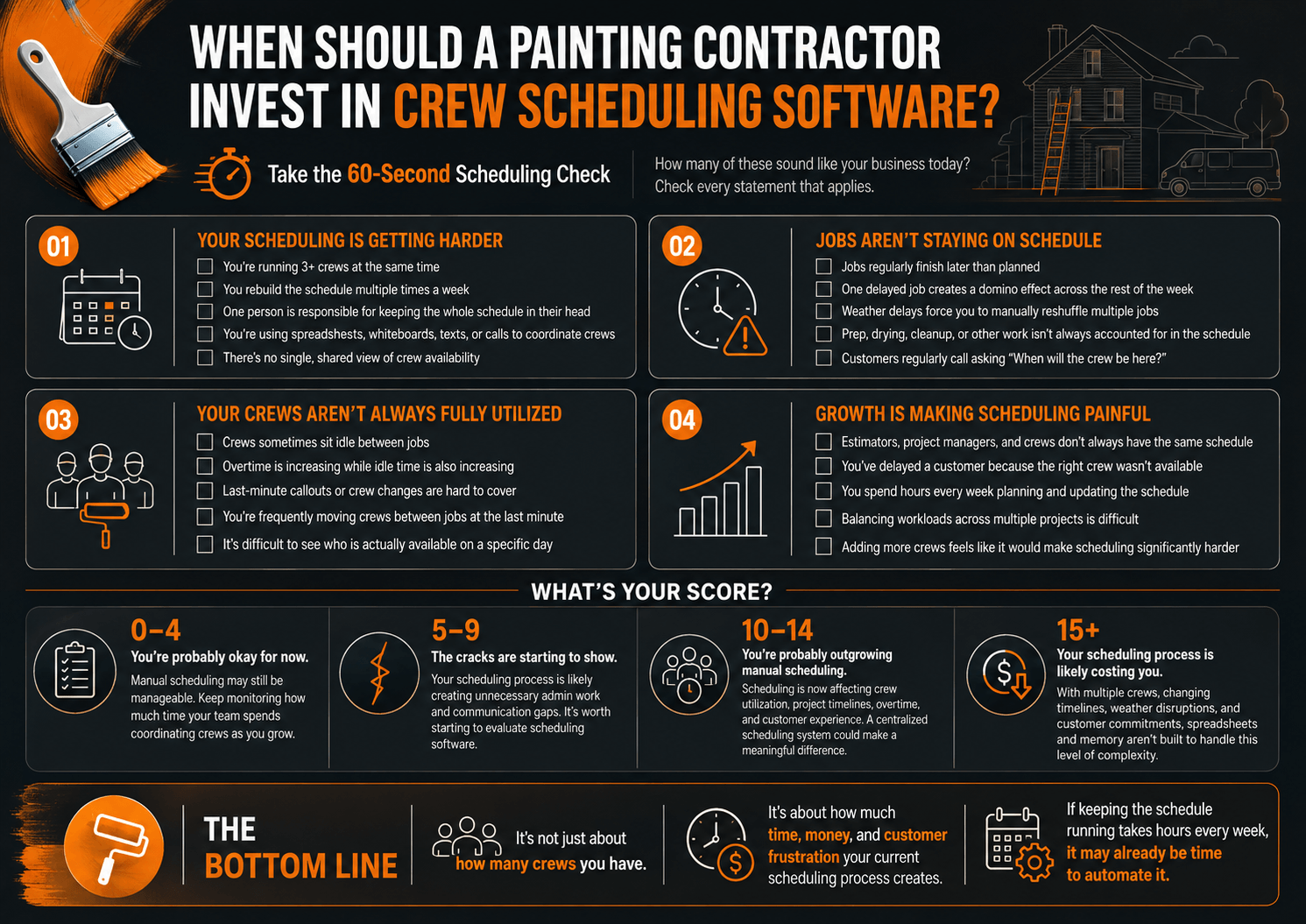
A strong diagnostic question to ask before investing:
If your scheduler were unavailable tomorrow, could someone else immediately understand where every crew should be and why?
If the honest answer is no, that alone is a strong signal that scheduling has outgrown manual methods.
What to Look for in Crew Scheduling Software
Not every scheduling tool is built for the realities of painting work. Here is what actually matters when evaluating options.
Essential scheduling capabilities
- Multi crew scheduling across active and upcoming jobs
- Real time crew availability
- Automatic conflict detection
- Drag and drop scheduling
- Fast rescheduling when plans change
- Capacity visibility across the whole team
Painting-specific capabilities
- Crew skill matching for specialized finishes
- Support for multiple crews working one large project
- Project phase tracking (prep, priming, finish coats, punch list)
- Weather related rescheduling tools
- Travel time and distance considerations between job sites
Integration capabilities
| Integration area | What it should connect to scheduling |
|---|---|
| Estimating | Planned labor hours feeding directly into the schedule |
| Job costing | Actual scheduled and worked hours tied to job level cost |
| Time tracking | Field clock in and clock out matched against the plan |
| Payroll | Hours flowing directly into payroll without manual re-entry |
| Accounting | Labor cost data reflected in financial reporting |
| ERP or project management | One connected system instead of several disconnected tools |
What Switching to Crew Scheduling Software Looks Like
Contractors researching this topic often want to know one more thing before committing: what does the actual transition involve? It is rarely an overnight change, it does not need to be, and treating it as a four step process rather than one big leap is what keeps the switch from disrupting active jobs.
Step 1: Get crew and job data into the system
This is the setup phase: crew profiles, skills, availability rules, and active jobs get loaded in. Most contractors start with their current active jobs rather than trying to backfill historical data, since the goal at this stage is a working schedule, not a complete archive. Skipping this step or rushing it is the single most common reason a rollout stalls, an incomplete crew profile or a missing skill tag just recreates the same visibility gap the software was meant to fix.
Step 2: Train foremen and office staff
The people who will use the system daily, dispatchers, office managers, and foremen, need a short, focused training session rather than a long rollout. Most scheduling platforms are designed to be usable within a few sessions. The people who most need buy in here are usually foremen, since they are the ones translating the schedule into instructions on site every morning.
Step 3: Run old and new systems in parallel briefly
Many contractors keep their previous method running alongside the new software for one to two weeks. This gives the team a safety net while they build confidence in the new process, and it means a scheduling mistake during the learning curve never turns into a missed job.
Step 4: Know what to expect in the first 30 to 60 days
Expect a short adjustment period as crews and office staff build new habits. The scheduling related delay reductions mentioned earlier, up to 30 percent within 90 days, are typical of this early adoption window, which means the payoff usually becomes visible well before the software is considered fully adopted.
| Phase | Typical timeline | Who is involved | What “done” looks like |
|---|---|---|---|
| Data setup | Days 1 to 5 | Owner or office manager | Active jobs and crew profiles are fully loaded |
| Training | Days 3 to 10 | Dispatchers, office staff, foremen | Every daily user can build and read a schedule unassisted |
| Parallel run | Weeks 1 to 2 | Whole team | Old method is used only as a backup, not the primary source |
| Early adoption | Days 30 to 60 | Whole team | New habits are routine, and delay related metrics begin improving |
The transition asks for a few weeks of extra attention, not a few months of disruption. Most of the friction contractors worry about in advance turns out to be smaller than expected, because the tool is only replacing a whiteboard or a group text, not the crew’s actual workflow on site.
KPIs to Measure After Implementing Crew Scheduling Software
Once the software is in place, these are the metrics that tell you whether it is actually working.
| KPI | What it tells you |
|---|---|
| Crew utilization | How effectively available labor is being used |
| Crew idle hours | Unused labor capacity |
| Planned vs. actual labor hours | Scheduling and estimating accuracy |
| Schedule adherence | How reliably jobs follow planned timelines |
| Overtime | Scheduling or capacity problems |
| Schedule variance | How much actual completion differs from plan |
| Revenue per crew day | Crew level productivity |
Track these monthly for the first two quarters after implementation. Most contractors see the clearest movement in crew utilization and overtime hours first, with schedule adherence and revenue per crew day following as the team fully adopts the new process.
Final Takeaway: Scheduling Is a Growth Control System, Not Just a Calendar
Everything in this article connects back to one line:
Estimate → Schedule → Assign Crew → Execute → Track Labor → Calculate Job Cost → Measure Margin
Scheduling sits in the middle of that chain, and it touches every link on either side of it. A painting contractor who treats scheduling as a calendar exercise is managing only the visible part of the problem. A contractor who treats it as a control system, connected to job costing, payroll, and capacity planning, is managing the business itself.
The stronger the connection between these activities, the more confidently a painting contractor can scale without losing control of labor, timelines, or margins. In a market where the U.S. painting industry is approaching $49 billion in value and the wider labor pool keeps tightening, contractors who fix scheduling early are the ones positioned to keep growing without their operations outpacing their control over them.
The tools have changed a great deal since Gantt sketched the first version of this idea by hand, but the underlying goal has not: one shared, trustworthy view of who is doing what and when. Painting contractors who build that view into their operations are simply applying a century old principle at the speed their business now demands.
FAQ
What is crew scheduling software for painting contractors?
It is a dedicated system that centralizes crew availability, job assignments, and schedule changes for painting businesses, replacing spreadsheets, whiteboards, and group texts with one shared, real time view that office staff and field crews can both rely on.
How does crew scheduling software improve crew utilization?
It gives managers visibility into which crews are idle, which are overloaded, and which have room for another job, so assignments can be made based on actual capacity rather than memory or guesswork. This is typically where contractors see the fastest measurable improvement.
Can crew scheduling software handle multiple painting jobs at once?
Yes. Most platforms are built specifically to manage several active jobs and crews simultaneously, with conflict detection that flags double bookings or unrealistic workloads before crews are dispatched.
Can scheduling software integrate with job costing?
Yes, and this is one of its most valuable capabilities. When scheduled and actual labor hours flow into job costing, contractors can see in near real time whether a job is tracking toward or away from its planned margin.
When should a painting contractor switch from spreadsheets to scheduling software?
Generally once you are coordinating more than two or three crews, rebuilding the schedule multiple times a week, or noticing overtime and idle time rising at the same time. These are the clearest operational signs that manual methods have stopped scaling with the business.