
Quick Summary
Generic ERP systems often promise streamlined operations, but painting and coating contractors quickly discover that standard workflows rarely align with the realities of field execution. From estimating and crew scheduling to job costing, change orders, and progress billing, every stage demands industry-specific processes and strong governance. This article explores why many ERP implementations fall short, the operational gaps they create, and how a custom painting contractors ERP can unify every department on a single source of truth while delivering better project visibility, profitability, and long-term operational control.
You invested in an ERP. You sat through the demos. You saw the dashboards, the real-time reports, the workflow diagrams. It all looked exactly like what your business needed.
Then go-live happened.t
Within weeks, your site supervisors stopped logging into the system. Your estimators went back to their Excel sheets. Your accountant was chasing project managers for numbers the ERP was supposed to capture automatically. You were paying for a system that your team was quietly working around.
If this sounds familiar, you are not alone and you did not make a bad decision. You likely made the same decision that thousands of contractors make every year: you bought a powerful painting contractors ERP and assumed the technology alone would solve your operational problems.
It rarely does.
“According to a recent survey, the most expensive mistake isn’t technical. 75% of ERP strategies are not strongly aligned with overall business strategy, leading to confusion and lackluster results. – Gartner
The Numbers Behind the Problem
Before we get into what painting contractors specifically need, it helps to understand how widespread this problem is across all industries.
Industry analyses consistently put the ERP implementation failure rate between 55% and 75%, meaning the majority of ERP projects do not meet their intended objectives. Gartner research further shows that only about 30% of ERP projects are completed on time and within budget, and more than 50% of organizations express dissatisfaction with their ERP implementations.
The financial damage is equally significant. According to research, 23% of ERP projects exceed budgets, and the reasons reveal deeper problems: half need additional technology that nobody planned for, and 40% underestimate staffing requirements.
Perhaps the most telling stat: according to the same research, less than a third of organizations reported an intense focus on organizational change management, which is the recommended approach for preparing employees and stakeholders for new processes and technology.
For a painting contractor running multiple job sites, managing subcontractors, and tracking materials across locations, the gap between a generic ERP implementation and what actually works in the field is enormous.
Why the Sales Demo Always Works
Here is something no ERP vendor will tell you during the sales process: demos are designed to succeed.
The data is clean. The scenarios are predictable. The business logic follows a straight line from order to invoice. Every button works exactly as intended.
What you never see in a demo:
- Three crews reassigned mid-week because of rain delays on a commercial job
- A change order submitted at 6pm that affects material procurement scheduled for 7am the next morning
- A site supervisor in the field who needs to log progress but has no laptop and inconsistent cell signal
- Paint consumption tracked across four active job sites with different coat specifications
- Progress billing tied to inspection milestones, not calendar dates
Generic demos show you the software working in a world that does not resemble how painting projects actually run. By the time go-live arrives, the gap between the demo and reality becomes a daily operational problem.
What Actually Happens After Go-Live
The first few weeks after go-live typically follow a predictable pattern in contractor businesses.
Teams continue using their old tools in parallel “just to be safe.” Site supervisors avoid the system because it takes longer than a WhatsApp message. Estimators maintain their own costing sheets because the ERP data does not match how they quote. Accounting loses real-time visibility because the field is not feeding the system. Duplicate work increases. Frustration builds.
Implementation timelines can extend by 30% beyond the original schedule, and 51% of companies experience significant operational disruptions when going live with a new ERP system.
The underlying cause is almost always the same: the ERP was configured around generic business processes, not around how a painting contractor actually operates.
The 8 Operational Gaps Generic ERPs Almost Always Miss
Gap 1: Estimating Does Not Flow Into Project Execution
In most generic ERP systems, an estimate is a sales document. Once the job is won, the estimate effectively ends. The project team starts fresh, often re-entering the same data the estimator already built.
What a painting contractor needs is a single, continuous workflow. The estimate should become the project plan. Surface areas, coat counts, material specifications, crew requirements, and timelines should flow directly from the estimate into scheduling, procurement, and job costing without anyone re-entering data.
When this connection is broken, cost variance is almost guaranteed from day one. that is where you require a custom painting contractors erp.
Gap 2: Crew Scheduling Is Not Dynamic
Generic ERP scheduling modules are built for predictable resource allocation. A manufacturing business assigns a machine to a job. A professional services firm assigns a consultant to a project. The resource is available, you assign it, done.
Painting contractor scheduling does not work this way. Crew availability changes daily. Weather causes last-minute site shutdowns. A crew finishing a job early needs immediate redeployment. Subcontractors confirm and cancel with short notice. Skilled painters cannot always be substituted with general labor.
A scheduling system that cannot handle real-time reassignment, track crew certifications, and notify affected jobs when changes happen will be abandoned by site supervisors within the first month.
Gap 3: Job Costing Is Not Truly Real Time
| What Generic ERP Tracks | What Painting Contractors Actually Need |
|---|---|
| Hours logged by department | Labor cost by surface type, coat, and crew |
| Material purchases by vendor | Paint consumption by job, product, and specification |
| Equipment asset value | Equipment cost allocated per active job site |
| Subcontractor invoices | Subcontractor cost against milestone completion |
| Period-end cost reports | Live budget vs. actual at any point in the project |
For painting contractors scaling their business, production rate tracking becomes more valuable than hourly billing. If it takes your crew four hours to complete a surface that the industry averages in two, you are losing twice the money on every comparable job.
Without real-time job costing that reflects how painting work is actually measured and priced, you cannot make mid-project corrections before the margin is already gone.
Gap 4: Field Teams Are Not Connected
Paper daily reports. Photos sent over WhatsApp. Verbal updates from supervisors. Approval requests sitting in someone’s email inbox. These are the symptoms of a field team that has been disconnected from the ERP, not because they are resistant to technology, but because the system was not designed for how they work.
A site supervisor on a scaffold at 7am does not have time to navigate a multi-step desktop workflow to log progress. They need a mobile interface that lets them record completed surfaces, flag issues, upload photos, and request materials in under two minutes.
When the ERP does not meet the field where the field actually operates, the field stops using it. And when the field stops feeding data into the system, every report, every forecast, and every billing calculation becomes unreliable.
Gap 5: Inventory Does Not Match Job Site Reality
Inventory management in a painting business has several layers that generic systems are not configured to handle well.
Paint products are project-specific. Tinting, sheen levels, and product specifications vary by job and sometimes by surface within the same job. Materials are transferred between sites. Partial quantities are returned. Waste and overage must be tracked against estimates to improve future quoting accuracy.
A warehouse inventory module designed for a distribution company will not naturally accommodate how a painting contractor moves and consumes materials across multiple active sites simultaneously.
Gap 6: Change Orders Become Operational Chaos
Change orders are not exceptions in painting and coating work. They are a regular part of project execution. Surface conditions discovered after work begins, scope additions requested by clients mid-project, and specification changes from architects or project managers all generate change orders that must be captured, priced, approved, and tracked.
In a generic ERP, this process frequently breaks down. Approvals are handled outside the system. Versions get confused. Billing is delayed because no one can confirm which changes were formally approved. Revenue is lost on legitimate scope additions that never made it into an invoice.
A change order workflow that is not embedded into the project, scheduling, procurement, and billing process is not a change order workflow. It is a paper trail.
Gap 7: Finance Operates Separately From Operations
Progress billing in contractor work is tied to milestones, inspections, and completion percentages, not to calendar dates or simple time-and-material calculations. When the finance team operates on a separate system from the operations team, two predictable problems occur.
First, invoicing is delayed because finance is waiting for operations to confirm milestone completion. Second, retainage tracking becomes manual, error-prone, and invisible to leadership until it becomes a cash flow problem.
The operations team and the finance team need to be working from the same data. In practice, that means the ERP must connect project milestones directly to billing triggers, not rely on someone remembering to send an email.
Gap 8: Leadership Cannot See Project Health Until It Is Too Late
This is the gap that costs painting contractors the most money.
Generic ERP dashboards show historical data. They tell you what happened last week, last month, or last quarter. For a business managing multiple active projects simultaneously, that information arrives too late to act on.
What leadership actually needs is a live view of budget variance by project, labor efficiency trends against estimate, material consumption vs. projection, and profitability forecast at any given point in the project lifecycle, not after the project closes.
When organizations treat ERP like a software purchase, they miss the fundamental point: ERP is a chance to rethink and improve how the business actually operates. For painting contractors, that means configuring the system around how projects are managed in the field, not how generic project templates work on a demo screen.
The Missing Piece: Governance
Very few talk about governance, which is the single biggest factor that determines whether your ERP investment pays off long-term.
Governance is not a corporate concept reserved for large enterprises. It is simply the discipline of defining who owns each process, who approves changes, how adoption is measured, and how the system evolves as your business grows.
Without governance, even a well-configured ERP will drift. Customizations accumulate without review. Teams develop workarounds that become unofficial standards. Data quality degrades. Reports become unreliable. Within two years, the system that was supposed to unify your business has become another silo.
Before any implementation begins, a painting contractor should have clear answers to these questions:
| Governance Question | Why It Matters |
|---|---|
| Who owns each workflow in the system? | Prevents conflicts and unapproved changes |
| What are the approval levels for change orders? | Eliminates revenue leakage |
| How will user adoption be measured monthly? | Catches abandonment before it becomes permanent |
| What is the process for adding a new customization? | Prevents technical debt buildup |
| Who defines what a successful project looks like in the ERP? | Aligns reporting with real operational goals |
| How will new crew members be onboarded to the system? | Maintains data quality as the team grows |
According to report, anything less than an intense focus on change management is often insufficient to counter the inevitable resistance from employees when asked to abandon familiar workflows, and this is true even in smaller organizations.
Governance is change management made permanent. It is the difference between an ERP that works at go-live and an ERP that still works three years later.
What a Well-Implemented ERP Looks Like for a Painting Contractor
The goal of a good ERP implementation is not to automate everything. It is to connect the workflows that are currently being handled in disconnected tools, and to eliminate the manual handoffs where information gets lost, delayed, or duplicated.
For a painting contractor, that connected workflow looks like this:
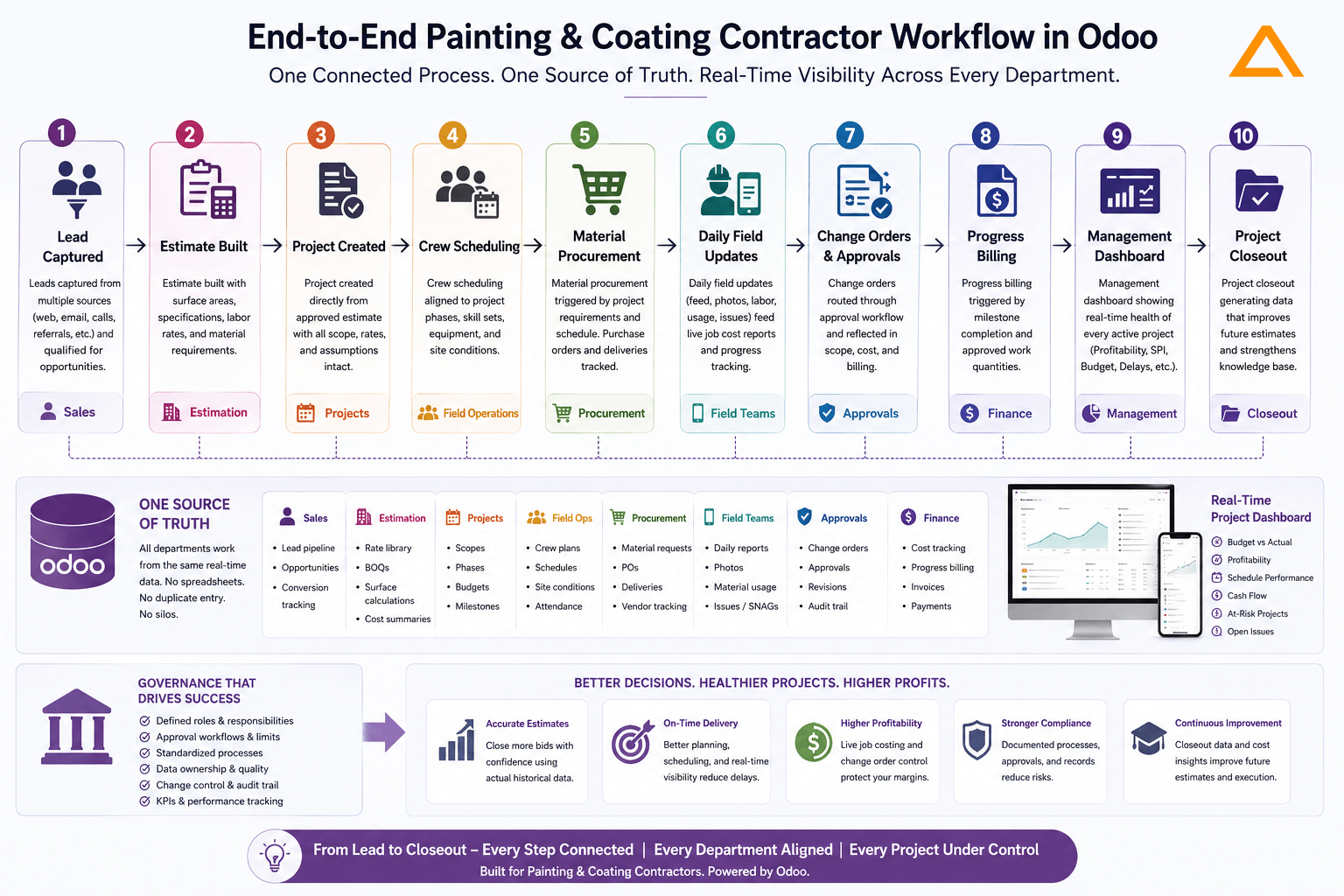
Every department works from the same data. No one is re-entering information that already exists somewhere else. The field feeds the office. The office serves the field.
Questions to Ask Before Buying or Re-Implementing a Custom Painting Contractors ERP
Instead of asking “Does it have a project management module?”, painting contractors should ask:
- Can an approved estimate become an executable project without re-entering any data?
- Can site supervisors update daily progress from a mobile device in under two minutes?
- Can we track actual paint consumption by product and specification against the estimate in real time?
- How does the system handle a change order that affects scheduling, procurement, and billing simultaneously?
- Can executives see live budget vs. actual for every active project, not just month-end reports?
- What governance tools does the system provide for managing customizations and measuring user adoption after go-live?
- How many painting or specialty contractor implementations has the implementation team personally completed?
That last question matters more than any feature comparison. An ERP implementation partner who understands how painting projects actually run in the field will configure the system differently than one working from a generic construction template.
The Real Lesson: Why Custom Painting Contractors ERP Wins
Generic ERP software is not the problem.
ERP failure is less about complete project collapse and more about falling short of expected outcomes, making these initiatives highly dependent on strong planning, governance, and change management.
Painting and coating contractors have a specific way of estimating, scheduling, costing, and billing that does not match the default configuration of any general-purpose ERP. The gap is not a technology gap. It is a configuration and governance gap.
The contractors who get real value from their ERP investment share three things in common: they chose a platform flexible enough to reflect how they actually work, they worked with an implementation partner who understood their industry, and they built governance into the project from day one, not as an afterthought.
Choosing the right ERP is a checkbox. How it is implemented and governed is what determines whether you are still using it two years from now, or quietly maintaining a parallel system of spreadsheets because the official system never quite fit.
We recently completed an Odoo ERP implementation for a painting and coating contractor. If you are evaluating ERP for your contracting business and want to understand what worked, what we would do differently, and what questions you should be asking vendors, we are happy to share what we learned.
Check our Success Story
ERP Software for Painting & Coating Contractors
Centralizing Field, Finance, and Compliance with Odoo
Industry: Painting & Coating/Construction
Location: Canada